Choosing a Commercial Security Partner for Multiple Sites
How do you choose a commercial security partner?
Choose a commercial security partner that can standardize your locations, coordinate with your IT team, and provide accountable support after installation. Compare network design, access control, video, documentation, training, and the cost of adding your next site.
As an IT Director or Facilities Manager, you are not looking for more dashboards to stare at. You are not looking for more vendors to manage. And you definitely are not looking for another system that promises "visibility" but really creates more noise, more alerts, and more responsibility on your plate.
You already own too much.
You manage infrastructure. You handle uptime. You support users. You think about compliance, continuity, and risk. In many organizations, physical security gets added to that list almost by accident. Suddenly, cameras, doors, credentials, video retention, audit trails, alarms, locksmith needs, and fire life-safety issues all land on your desk.
That is exactly why choosing the right commercial security partner matters so much.
At Alen Security, we believe your security system should help you do your job, not become your job. That idea drives everything we design, install, and support. We build systems for busy professionals. We do not believe the best use of your time is sitting in front of a wall of monitors watching live video all day. That model is inefficient, expensive, and unrealistic for most businesses.
KEY TAKEAWAYS
- Choose a partner, not just a product supplier. Long-term accountability matters more than a one-time installation.
- Standardize across sites. Consistent naming, permissions, reporting, and retention settings make support and compliance easier.
- Protect the network as well as the building. Cloud and hybrid systems should support remote management without requiring inbound open firewall ports.
- Centralize administration. One coordinated environment reduces overhead and helps you maintain control across multiple locations.
- Use analytics and automation to reduce manual monitoring. Smart alerts and searchable events are a better fit for busy teams than constant live viewing.
- Plan for growth. Scalable design prevents rework when you add locations, users, cameras, and doors.
Instead, we focus on practical outcomes:
- Advanced analytics that help detect meaningful events.
- Proactive notifications that tell you when action is needed.
- Smart automation that handles routine responses.
- Centralized tools that let you manage multiple locations without jumping between platforms.
- Standardized system design that simplifies support, reporting, training, and compliance.
That approach creates something every overstretched IT Director and Facilities Manager wants more of: control without constant supervision.
If you are evaluating providers for a retail chain, warehouse network, office portfolio, healthcare environment, school campus, distribution operation, or growing multi-location business, this long-form guide will help you make a better decision. It is built around the practical qualities that matter most in the field: a partner who builds real relationships, brings disciplined standardization, protects your environment with a truly secure architecture, gives you centrally managed control, applies hard-earned experience, delivers consistent quality, supports future growth with scalable design, and keeps the day-to-day experience simple enough to run under pressure.
These ideas are not abstract values. They are decision criteria. They affect how fast you can respond to incidents. They affect whether your cloud system creates unnecessary cybersecurity risk. They affect whether your team can generate a clean audit trail under pressure. They affect whether adding a new site is easy or painful. And they affect whether your security investment delivers peace of mind or ongoing frustration.
Why does choosing a commercial security partner feel harder than it should?
Because most businesses are not just buying cameras or door readers. They are choosing a long-term operating model that affects compliance, cybersecurity, investigations, support, and accountability across every location.
The commercial security industry has a reputation for complexity for a reason. Too many projects are sold as disconnected products instead of complete business systems.
One company handles cameras. Another handles access control. A third handles alarms. A fourth handles locksmith work. A fifth handles fire alarm inspections. A sixth "helps" with remote access. Then, when something fails, everyone points at someone else.
That is not a technology problem. It is a partnership problem.
The right security company should not just install equipment. They should reduce vendor sprawl, align systems with your operational goals, and give you a clear, accountable path from planning through support. When you are responsible for multiple sites, multiple stakeholders, and multiple compliance requirements, that level of accountability is not optional.
This is why the best buying decision is rarely about who has the cheapest camera or the flashiest mobile app. It is about whether the provider can help you create a security program that is secure, standardized, manageable, and sustainable.
And for multi-site businesses, the stakes are higher than they first appear.
A commercial security system is not just a set of devices. It becomes part of your operating model. It affects employee entry, visitor handling, incident response, loss prevention, investigations, compliance documentation, and business continuity. It touches your network. It touches your HR workflows. It touches your maintenance process. In some cases, it also touches legal exposure.
That is why the buying process can feel heavier than it should. You are not simply choosing hardware. You are choosing how accountability will work across sites. You are deciding whether standards will be easy to maintain or impossible to enforce. You are deciding whether remote visibility will be convenient and secure, or convenient but risky. You are deciding whether your next three years will be calmer or more chaotic.
The best security partners understand that pressure.
They know your business value goes far beyond the numbers on a quote. They know a missed door event can become an HR issue. They know a weak audit trail can become a compliance issue. They know a poorly deployed camera can become a liability issue. They know a cloud connection designed the wrong way can become an IT issue.
So the real question is not simply, "Who can install this system?"
The real question is, "Who can help us safeguard our people, restrict risk, standardize operations, and prevent this system from becoming another burden?"
That is the lens this guide uses.
Should you use one commercial security partner or multiple vendors?
For most multi-site businesses, one accountable partner is the better choice. It reduces vendor sprawl, shortens troubleshooting, improves consistency, and gives you a clearer path from planning through support.
Relationships matter because physical security is an operational system that touches your buildings, your network, your employees, your visitors, and your compliance posture. If the provider disappears after install, your team is left managing the gaps.
A strong security relationship gives you:
- A team that understands your environment and history.
- Better continuity across upgrades, expansions, and service calls.
- Faster issue resolution because the provider already knows your standards.
- Less time repeating yourself to different contractors and help desks.
- More confidence that problems will actually get solved.
At Alen Security, this is why we emphasize end-to-end service. We consult. We design. We install. We maintain.
CONSULT. DESIGN. INSTALL. MAINTAIN.
That matters in practical ways. If your access-controlled opening is having issues, the problem may involve credential rules, reader behavior, door hardware, power, network connectivity, or physical alignment. When those responsibilities are fragmented, support gets messy fast. When they are coordinated by one accountable partner, your life gets easier.
Strong relationships also create strategic value. Over time, a true partner helps you make better decisions about lifecycle planning, standards, and future growth. They can help you answer questions like:
- Should this next site be cloud, on-premise, or hybrid?
- Can we reuse any legacy infrastructure without introducing risk?
- Which locations need higher-priority upgrades?
- Where are we overcomplicating policy or support?
- How do we maintain consistency as we grow?
If a security company treats your project like a transaction, expect transactional results. If they treat it like a long-term operational partnership, you get better accountability and better outcomes.
This is where relationships become more than a soft concept. They become a performance advantage.
When your partner knows your naming standards, your network policies, your credentialing rules, your compliance expectations, and your internal stakeholders, projects move faster. Service calls get shorter. Expansion gets easier. Decisions become less reactive. Instead of re-explaining your environment every time something changes, you work with a team that already understands the context.
That is especially important for multi-site businesses. A regional retailer, warehouse operator, or distributed office portfolio does not need six different local opinions and six different ways of doing things. You need consistency backed by people who know your environment well enough to protect it.
Real partnership also creates trust during uncomfortable conversations. Sometimes the right answer is not the cheapest answer. Sometimes the right answer is to replace aging door hardware before it causes recurring downtime. Sometimes the right answer is to phase a project instead of forcing a rushed full rip-and-replace. Sometimes the right answer is to say no to a shortcut that would create cybersecurity or service problems later.
A provider who values long-term relationships will have those conversations honestly.
That matters because your system is not judged on install day. It is judged six months later when an incident happens. It is judged a year later when a site expands. It is judged when HR needs a clean audit trail. It is judged when leadership asks whether your standards are being followed across locations.
A real partner helps you answer yes with confidence.
Why does standardization matter in multi-site commercial security?
Standardization makes security easier to support, easier to audit, and easier to scale. It gives you consistent naming, permissions, retention, reporting, and workflows across every location.
Standardization is one of the most important parts of a strong commercial security program. It is one of the biggest reasons some multi-site environments stay manageable while others become a constant source of confusion.
Without standardization, you end up with:
- Different camera naming conventions at every site.
- Different badge formats and permission groups.
- Different retention settings.
- Different alert rules.
- Different hardware generations with different support needs.
- Different reporting expectations depending on who installed what.
That may sound manageable when you have two or three locations. It becomes a real problem when you have ten, twenty, or fifty.
Standardization gives you operational leverage.
For example, when an HR termination happens, standardized access control rules make it easier to revoke access consistently across all locations. When a compliance issue arises, standardized retention settings and standardized audit trail workflows make it easier to produce records. When a new facility opens, standardized templates reduce deployment time and training time.
This is also where central management becomes more useful. A centralized dashboard is only powerful if the underlying environment is structured well. If every site is configured differently, central management becomes a prettier way to view chaos.
At Alen Security, we help customers create standards around:
- Camera placement and naming.
- Door group structure and schedules.
- Access levels and user roles.
- Retention policies and export practices.
- Alerting thresholds and notification workflows.
- Hardware selection by use case.
- Expansion planning for future sites.
Standardization is not about making every building identical. It is about creating enough consistency that your systems stay understandable, supportable, and defensible.
That matters for uptime. It matters for onboarding. And it matters for audit readiness.
For busy teams, standardization is one of the fastest ways to reduce friction without reducing capability.
Think about what happens when a location manager reports an issue. If every site uses a different naming structure, different device mix, different credential rules, and different reporting expectations, your team spends its time translating. Translation is wasted effort. It slows support. It creates mistakes. It weakens accountability because no one is sure whether Site A is supposed to work like Site B.
A standardized environment fixes that.
It gives you common language. It gives you repeatable workflows. It gives you cleaner training. It gives you more reliable escalation. It also gives you a stronger compliance posture because your audit trail is not dependent on each location improvising its own process.
This matters in industries with strict operational expectations. Warehouses need consistent restricted-area access. Retail chains need repeatable store opening and closing workflows. Multi-tenant offices need structured credential management. Distribution centers need camera coverage that follows the same logic from site to site so investigations are not reinvented every time.
It also matters financially.
Without standards, every site becomes a small custom project. Custom projects cost more to support. They cost more to document. They cost more to troubleshoot. They often cost more to expand. Standardization protects your investment by making future decisions easier.
That is one reason we talk so much about simplicity. Simplicity does not happen by accident. It is often the result of disciplined standardization done well.
Should cloud security systems require open firewall ports?
No. Modern cloud and hybrid security systems should deliver remote visibility and control without requiring inbound open firewall ports that expand your attack surface.
This pillar deserves extra attention.
Modern physical security systems are connected systems. Cameras are IP endpoints. Access control platforms live on your network. Cloud management touches identity, devices, logs, and remote administration. That means your physical security platform can either support your cybersecurity posture or undermine it.
The wrong design can create risk fast.
When evaluating a provider, ask a simple question: Does your cloud access or cloud video solution require inbound open firewall ports?
If the answer is yes, keep digging.
Busy IT professionals do not want to punch holes in the firewall just to make a security product work. And they should not have to. Cloud convenience should not come at the cost of increased exposure. Secure remote connectivity should be designed to reduce attack surface, not expand it.
At Alen Security, we strongly emphasize solutions that do not require inbound open firewall ports for cloud access control or cloud video workflows. That supports a cleaner, more secure architecture while still giving authorized users the remote visibility and administrative control they need.
That is a practical security advantage.
It means:
- Less unnecessary external exposure.
- Better alignment with modern IT security expectations.
- Fewer exceptions for your team to defend internally.
- Stronger confidence that your physical security tools are not creating cyber liabilities.
Security also includes device health and lifecycle management. Ask your provider:
- Are the products NDAA compliant where appropriate?
- How are firmware updates handled?
- How are vulnerabilities monitored and remediated?
- What logging is available for administrative actions?
- How is user access controlled and audited?
- What happens when devices go offline or fall behind on updates?
A good security integrator should be comfortable having this conversation with your IT team. If they only want to talk about resolution, frame rates, and card readers, they are missing the bigger picture.
Physical security should not be the back door into your environment. It should be designed to safeguard people and property without weakening network security.
This is where being secure has to mean more than encrypted marketing language.
It should mean the architecture respects your IT policies. It should mean remote access is thoughtfully designed. It should mean permissions are controlled, administrative actions are logged, and devices can be maintained without guesswork. It should mean your provider understands that every connected camera, controller, and appliance becomes part of a broader risk conversation.
That is why security and quality are closely tied together. A poor install is not just messy. It can create unmanaged devices, inconsistent configurations, weak documentation, and avoidable exceptions that put your team in a difficult position later.
A secure design also supports faster incident response. When you know who has access, what changed, when it changed, and where to find the relevant logs, you are in a much stronger position to investigate issues. That is the value of a clean audit trail. It is not just a compliance phrase. It is the record that helps you establish accountability under pressure.
And just as important, secure design should not make the system harder to use. The right partner protects the environment and keeps the experience simple enough for daily operations.
That balance matters.
What are the benefits of centrally managed security for multiple locations?
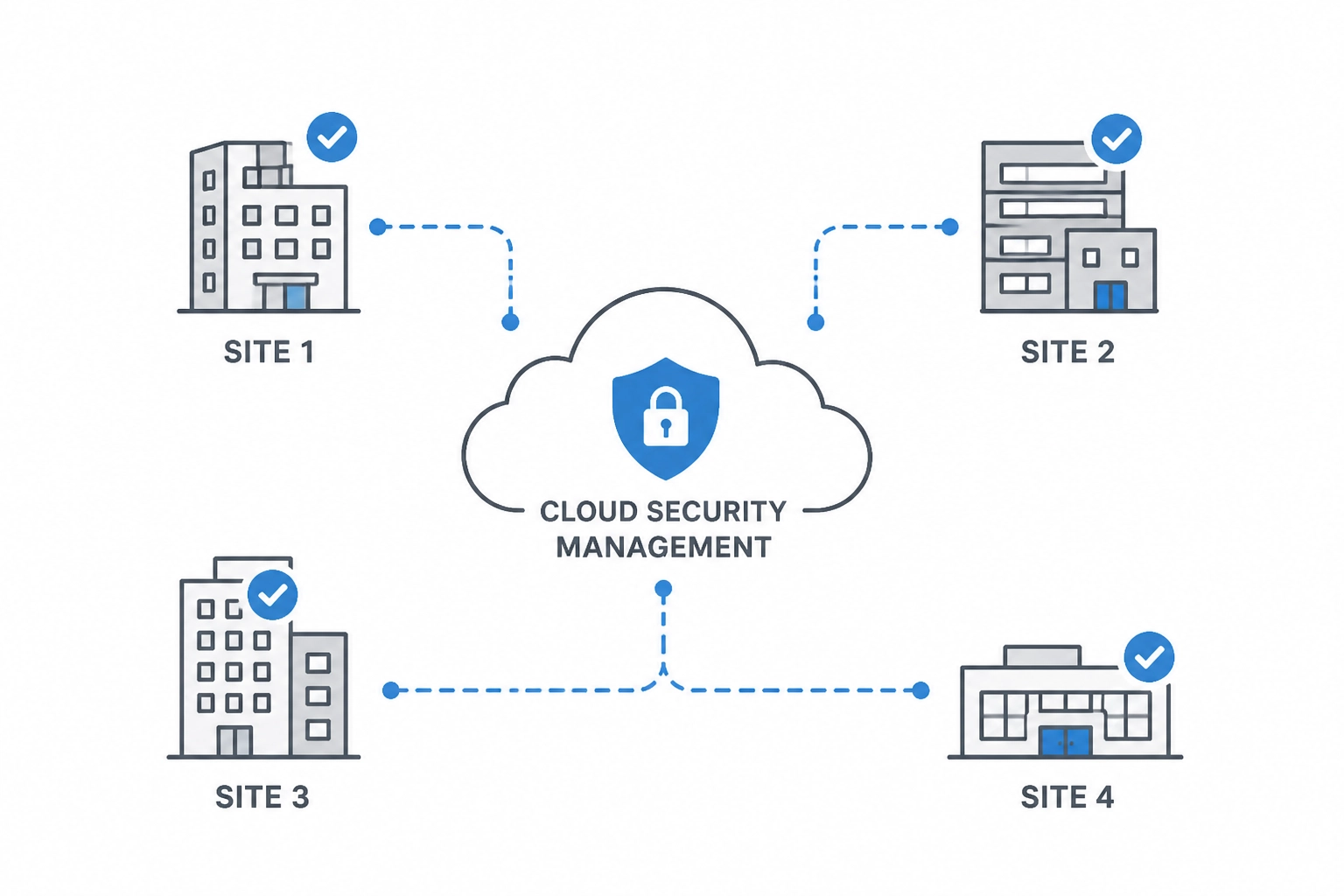
Centrally managed security helps you control users, doors, video, schedules, and reporting across all sites from one environment. That reduces overhead, improves response time, and keeps standards consistent.
Central management is one of the biggest quality-of-life improvements a modern commercial security program can deliver.
If your team is managing separate systems at each site, the overhead adds up fast. Different logins. Different video interfaces. Different badge workflows. Different support paths. Different reports. Different procedures when something goes wrong.
That model does not scale.
A centrally managed environment allows you to:
- Administer users across multiple sites from one interface.
- Revoke or change credentials quickly across the organization.
- Review events without physically going to each location.
- Standardize permissions, schedules, and reporting.
- Support regional and nationwide operations more efficiently.
- Reduce the time it takes to investigate incidents.
This is especially important for retail, distribution, and portfolio-style businesses. If you are responsible for dozens of doors and hundreds of cameras across multiple states, fragmented management becomes its own operational risk.
But central management should not be confused with central babysitting.
This is where we need to be clear: we do not believe busy professionals should spend their day watching live video feeds.
That old-school model sounds reassuring, but in most commercial environments it is not realistic and it is not efficient. The better model is event-driven awareness.
That means your system should help surface what matters through:
- Motion and object analytics.
- Smart search tools.
- Exception-based notifications.
- Door held open alerts.
- Access denied trends.
- Unusual after-hours activity flags.
- Camera health notifications.
- Automated reporting.
Instead of forcing you to stare at screens waiting for something to happen, the system should tell you when an event meets the threshold for attention. That is a much better fit for how real IT Directors and Facilities Managers work.
You should be able to focus on your job while the system handles the routine monitoring layer in the background.
That is what central management looks like when it is designed for real operations.
For multi-location organizations, being centrally managed is not a luxury. It is how you preserve control as the footprint grows.
Without central administration, every task takes longer. New hires require site-by-site updates. Terminations require manual cleanup in multiple places. Incident reviews become scavenger hunts. Reporting becomes inconsistent. Even small tasks expand into process overhead because the environment is fragmented.
Central management changes that. It gives you one place to restrict access, review activity, confirm policy, and maintain standards. It supports accountability because more actions are visible and easier to verify. It supports relationships because your provider can support the whole environment instead of treating each location like an isolated exception.
And when the system is paired with smart analytics, central control becomes more powerful.
You do not need people parked in front of screens. You need the platform to surface meaningful exceptions. You need health alerts when a device goes offline. You need notifications when a door is held open too long. You need searchable video and event data that lets you move from question to answer quickly.
That is a much more disciplined model than manual screen monitoring.
It protects attention, which is one of the scarcest resources your team has.
Why does experience matter when choosing a commercial security integrator?
Experience helps a provider anticipate real-world issues before they become expensive problems. It improves planning, modernization, deployment quality, and long-term support.
Experience matters because security systems live in the real world, not in the demo room.
Buildings have quirks. Networks have constraints. Users have habits. Weather matters. Traffic flow matters. Shift schedules matter. Local code matters. Existing infrastructure matters. Growth plans matter.
A provider with decades of experience sees these issues early. They ask better questions. They recognize patterns faster. They know when a low-cost shortcut will create a high-cost problem later.
At Alen Security, our 50+ years of experience are not just a number. They show up in practical decisions every day:
- Designing systems that work in demanding commercial environments.
- Recommending hardware that holds up over time.
- Coordinating disciplines like video, access, intrusion, locksmith work, and fire systems.
- Anticipating support needs before they become emergencies.
- Helping customers balance capital cost, operating cost, and long-term maintainability.
Experience is especially valuable when you inherit an outdated or inconsistent environment. Many IT and facilities leaders do not get to start from scratch. They inherit old DVRs, unsupported cameras, different badge systems, unreliable door hardware, inconsistent user permissions, and compliance concerns that have been building for years.
That is where an experienced partner can bring order.
They can help you decide what should stay, what should go, what can be integrated temporarily, and what needs immediate replacement. They can help you prioritize risk instead of trying to replace everything at once. And they can help you create a realistic roadmap, not just a wish list.
Experience gives you confidence that the provider has solved problems like yours before.
In commercial security, experience protects you from learning the hard way.
An inexperienced provider may be able to sell a platform. That is not the same as understanding how to deploy it cleanly across real buildings with real constraints. They may not spot the wiring problem that will hurt reliability later. They may not anticipate how a warehouse environment changes camera selection. They may not understand how credential policies need to work differently for executives, contractors, temporary staff, and regional managers. They may not coordinate properly with locksmith work, door hardware, intrusion, or fire alarm obligations.
Those gaps add up.
Experience also matters during modernization. Most organizations are not starting from a blank page. They are living with a mix of old and new. They may need to phase capital spending. They may need to preserve uptime during migration. They may need to support a business opening schedule while systems are upgraded in the background.
That is where decades of field experience are valuable. An experienced partner can sequence work properly. They can flag dependencies early. They can prevent a rush to deploy technology that looks good in a demo but creates friction in the field.
That practical judgment is easy to overlook during procurement. It becomes obvious later.
When a provider has seen enough environments, they stop designing for the sales presentation and start designing for the operating reality. That is the kind of experience that creates peace of mind.
What does quality look like in a commercial security installation?
Quality means more than hardware. It includes clean design, proper camera placement, reliable door hardware integration, stable network coordination, documentation, testing, training, and responsive support.
Quality is not only about which brand of camera gets installed. It is about the total system.
A high-quality commercial security deployment includes:
- Clean, intentional design.
- Proper hardware selection for the use case.
- Thoughtful camera placement.
- Reliable door hardware integration.
- Good documentation.
- Tested workflows.
- Clean cable management.
- Stable network integration.
- Clear end-user training.
- Responsive service after go-live.
Poor quality shows up everywhere. Cameras placed too high to capture useful detail. Doors that look "installed" but do not close consistently. Credentials that are hard to manage. Alerts that trigger too often to be trusted. Incomplete documentation. Messy support handoffs.
Quality also affects adoption. If the system is unreliable or confusing, your team stops trusting it. Then you lose one of the most important benefits of a modern security platform: confidence.
That is why we take an end-to-end view of quality. It should be evident from consultation through ongoing support. The quality of the install affects the quality of the data. The quality of the data affects the quality of the analytics. And the quality of the analytics affects whether your team gets useful notifications or just noise.
This is one more reason we do not promote a "watch live video all day" philosophy. If your only operational strategy is constant manual observation, you are compensating for weak system design. A quality system should help automate awareness through reliable events, smart analytics, and clean workflows.
In short: quality is not an upgrade. It is the difference between a system that helps and a system that drains time.
For us, quality is tied directly to trust.
If cameras do not capture usable detail, you do not trust the footage. If the access control workflow is clumsy, you do not trust the permissions. If door hardware fails inconsistently, you do not trust the opening. If alerts are noisy and poorly configured, you do not trust the event feed. And when trust drops, people start creating workarounds.
Workarounds are dangerous.
They lead to badge sharing. They lead to manual logs. They lead to unsupported remote access habits. They lead to delayed investigations because no one is sure where the right data lives. A quality system prevents those behaviors by making the right process the easiest process.
That is why quality also includes documentation, training, and service. The install is only one moment in the system lifecycle. The real test is whether the system continues to perform, whether your team knows how to use it, and whether support is responsive when conditions change.
Quality protects uptime. It protects accountability. It protects the credibility of the entire security program.
And for multi-site businesses, quality must be repeatable. A single flagship location with a polished install does not solve the bigger challenge. You need consistent quality across the whole footprint so every site supports the same standard of confidence.
How do you choose a commercial security system that can scale?
Choose a system with repeatable standards, centralized management, secure architecture, and workflows that can expand without forcing a redesign every time you add a new location.
Scalability is not just about whether the software can technically support more devices. It is about whether your people, processes, and support model can support growth without multiplying friction.
A scalable security program should let you:
- Add locations without reinventing policy.
- Add doors and cameras without rebuilding administration.
- Add users without creating permission chaos.
- Expand reporting without complex manual work.
- Preserve standards as the footprint grows.
- Support remote management across regions.
This is where the eight pillars work together. Scalability depends on relationships, standardization, secure architecture, central management, experience, quality, and simplicity. If any of those are missing, growth gets messy.
For example:
- If you lack standardization, each new location becomes a custom project.
- If you lack central management, each new site adds administrative overhead.
- If you lack simplicity, training burden grows with every expansion.
- If you lack secure architecture, cloud growth may introduce unacceptable cyber exceptions.
- If you lack relationship continuity, support quality drops as the environment expands.
We often talk to businesses that started with a few standalone systems because that was "good enough at the time." Then the company added more sites, more employees, more compliance demands, and more risk. Suddenly the original decisions become operational bottlenecks.
A scalable strategy avoids that trap.
Whether you manage a single warehouse today or a regional retail network tomorrow, your security environment should support growth without forcing a total reset.
Being scalable means planning for the next site before it becomes urgent.
That does not mean overbuilding. It means making deliberate decisions now so future growth is not punished later. It means selecting platforms that support expansion cleanly. It means using templates, standards, and permission structures that can be repeated. It means thinking about how reporting, support, and administration will work when the footprint doubles.
Scalability is also about preserving simplicity over time.
Some systems appear affordable because they solve the immediate need at one location. But once you add more sites, they create management sprawl. More interfaces. More manual steps. More local exceptions. More training. More troubleshooting. The real cost shows up later in labor, inconsistency, and slower response.
A scalable design prevents that by creating a framework your business can grow into.
That matters for regional and nationwide retail. It matters for warehouse networks. It matters for office portfolios. It matters for any business that may add locations, change operating hours, expand headcount, or face new compliance obligations.
Growth should not force you to start over.
Why is simplicity important in commercial security systems?
Simple systems are easier to use under pressure. They reduce manual steps, improve consistency, speed up incident response, and help busy teams stay in control without becoming security specialists.
Simplicity is often misunderstood. It does not mean basic. It means usable.
A simple security program can still be highly capable. In fact, the best systems often feel simple precisely because the complexity is handled well behind the scenes.
For a busy IT Director or Facilities Manager, simplicity means:
- Clear interfaces.
- Logical permissions.
- Repeatable workflows.
- Useful alerts.
- Fewer manual steps.
- One accountable support path.
- Less need to remember site-by-site exceptions.
Simplicity matters during routine operations, but it matters even more during stressful moments. When an incident happens, nobody wants to dig through five systems and three manuals just to export footage or verify a door event. You need clarity.
That is why we build for operational simplicity:
- Search video quickly.
- Review meaningful events fast.
- Produce audit trails efficiently.
- Manage credentials without confusion.
- Get notified when intervention is needed.
- Trust the system to handle the rest.
Again, that means we lean into analytics, automation, and proactive notification instead of requiring constant live monitoring.
DETECT. NOTIFY. RESPOND. RETURN.
That is the rhythm busy professionals need. Detect what matters. Notify the right people. Respond appropriately. Return to the work that actually drives the business.
In a strong commercial environment, simple is not a compromise. It is a design goal.
The right system should reduce the number of decisions your team has to make in the middle of a busy day. It should make common tasks obvious. It should make rare but important tasks manageable under stress. It should help you restrict access, find events, export evidence, and verify actions without needing a specialist for every step.
This is where simplicity and relationships intersect. A provider who knows your environment can help keep workflows clean over time instead of layering on exceptions until the system becomes hard to use.
It is also where simplicity and standardization intersect. Repeatable naming, repeatable permissions, repeatable reporting, and repeatable support paths are what make the environment feel understandable instead of fragile.
And just as important, simplicity supports accountability. If a system is too confusing to operate, important steps get skipped. If it is clear, your team is more likely to follow policy consistently.
Simple systems get used. Used systems create value. That is the point.
Why do advanced analytics matter more than live monitoring?

Yes. In most commercial environments, analytics, proactive notifications, and smart search are more effective than expecting busy teams to constantly watch live video feeds.
One of the biggest mindset shifts in commercial security is moving from passive recording and manual observation to active intelligence.
Traditional thinking says more screens equal more security. In reality, more screens often just mean more information that nobody has time to process. Most organizations do not have dedicated personnel sitting in front of video walls all day, and even if they did, people are not great at maintaining constant vigilance across dozens of feeds for hours at a time.
That is why we believe smarter systems beat constant watching.
Advanced analytics can help identify:
- Unusual motion patterns.
- Loitering in restricted areas.
- After-hours activity.
- Vehicle or object attributes.
- People entering specific zones.
- Occupancy trends.
- Access anomalies.
- Searchable event patterns that speed investigations.
This makes video more actionable.
Instead of asking someone to remember when an incident may have happened, you can search by event type, motion, time window, direction, object trait, or related access event. Instead of waiting for someone to notice a problem live, the system can send a proactive notification when a threshold is met.
This is a better use of both technology and human attention.
For multi-site businesses, that matters even more. If you are responsible for a retail chain, a distribution portfolio, or multiple offices, live monitoring across every site is not realistic. Event-based awareness, centralized search, and automation are.
This approach also improves accountability. When the system is designed around exceptions, analytics, and documented workflows, the resulting audit trail is stronger. You can show what happened, when it happened, what triggered a notification, and how your team responded.
That is operational value. That is compliance value. And that is peace of mind.
This point is worth underscoring because it changes how you should evaluate a partner.
If a provider talks as if security effectiveness depends on people staring at screens all day, they are describing an outdated operating model for most commercial organizations. It sounds reassuring, but it usually creates labor cost, alert fatigue, and false confidence. Human attention is limited. Even well-intentioned teams miss things when they are asked to watch too much for too long.
Intelligent analytics are different.
They help the system do the first layer of work. They flag anomalies. They accelerate searches. They connect related events. They reduce the time between an incident and a response. They also make your environment more defensible because actions are based on defined thresholds and documented activity, not vague recollection.
That does not mean people are removed from the process. It means people are reserved for the moments that actually require judgment.
That is a far better model for a time-poor IT Director or Facilities Manager.
You should not have to babysit your system to get value from it. The system should help deter, detect, restrict, and prevent while giving you the confidence that the right information will surface when needed.
That is what modern commercial security should look like.
How do you evaluate a commercial security partner?
If you are comparing vendors, ask questions that map directly to the operating realities above, not just the feature sheet.
RELATIONSHIPS
- Will you be our long-term support partner or just the installer?
- Do you use sub-contractors for key parts of the job?
- Who owns the outcome when something fails?
- How do you stay aligned with our internal stakeholders over time?
STANDARDIZATION
- How do you help multi-site customers create consistent naming, permissions, and reporting?
- Can you standardize new sites using templates and repeatable workflows?
- How do you support audit trail consistency?
- What standards do you recommend across cameras, doors, schedules, and user roles?
SECURE
- Do your cloud video and cloud access solutions require inbound open firewall ports?
- How do you handle firmware updates and vulnerability response?
- What cybersecurity practices are built into your design approach?
- How do you protect remote administration without weakening our network posture?
CENTRALLY MANAGED
- Can we manage users, doors, schedules, video, and reporting from a single platform or coordinated interface?
- How do you support remote administration across multiple locations?
- How do you reduce alert noise?
- How do you help teams investigate incidents across sites without switching tools constantly?
EXPERIENCE
- How long have you been serving commercial clients?
- What types of environments have you deployed in?
- How do you approach modernization when legacy systems are involved?
- What have you learned from similar multi-site projects that would apply to us?
QUALITY
- What does your install and testing process look like?
- How do you document the final environment?
- What makes your workmanship and support different?
- How do you validate that analytics, notifications, and workflows are tuned correctly before handoff?
SCALABILITY
- How does this system handle additional sites, users, doors, and cameras?
- Will we need to redesign our environment when we grow?
- How do you help customers plan for phased expansion?
- How do you preserve standards as more locations come online?
SIMPLICITY
- How intuitive is the administrative workflow?
- How much training will our team need?
- How do you ensure the system helps busy professionals instead of creating more overhead?
- How do you reduce the number of manual steps required for common tasks?
A provider who can answer these questions clearly is far more likely to deliver a system that works in the real world.
And pay close attention to how they answer, not just what they answer.
Do they sound like they understand operations, compliance, and support? Do they speak comfortably about both physical security and network security? Do they understand that your team needs visibility without complexity? Do they naturally talk about accountability, repeatability, and lifecycle planning?
Those signals matter.
What should the right security partner deliver?
By the end of your evaluation, the right commercial security partner should be able to deliver a clear picture of how they will help you:
- Protect people, property, and operations.
- Avoid unnecessary cyber exposure.
- Centrally manage multiple sites.
- Standardize workflows for compliance and support.
- Reduce vendor sprawl.
- Use analytics and automation instead of relying on nonstop live monitoring.
- Scale with your business.
- Keep day-to-day administration simple.
That is the real goal.
Not more complexity. Not more screens. Not more noise.
More control. More confidence. More accountability. More time back.
A strong partner should also be able to show you how all of those benefits work together.
Relationships make service and planning smoother. Standardization makes support and compliance easier. Secure architecture protects your network without taking away flexibility. Central management reduces overhead across the footprint. Experience helps you avoid expensive mistakes. Quality creates trust in the system. Scalable design protects future growth. Simplicity makes the whole environment easier to run.
That is how a security program becomes sustainable.
It stops being a patchwork of products. It becomes an operating system for protection, accountability, and peace of mind.
For busy leaders who inherited physical security on top of everything else, that is the outcome that matters most. You do not need more moving parts. You need one trusted partner who can simplify the environment, protect the business, and help the system quietly do its job in the background.
That is what good commercial security should feel like.
What do the best commercial security partners consistently get right?
| Capability | Why It Matters To You |
|---|---|
| Strong relationships | You get a trusted partner who knows your environment and stays accountable over time. |
| Standardized delivery | Consistency across sites improves support, training, compliance, and audit trail quality. |
| Secure architecture | Cloud access and video should not require inbound open firewall ports that increase exposure. |
| Centralized management | One interface and one strategy reduce friction across multiple locations. |
| Proven experience | Decades of real-world delivery help prevent mistakes and support better decisions. |
| High-quality execution | Better design, installation, documentation, and service produce stronger long-term results. |
| Scalable design | The system can grow with your footprint without creating new management problems. |
| Operational simplicity | Busy professionals need useful alerts, intuitive workflows, and less manual oversight. |
If you remember nothing else from this guide, remember this: the right commercial security partner helps you create an environment that is secure, manageable, repeatable, and ready for growth. They help you safeguard the business without overwhelming the people responsible for running it.
FREQUENTLY ASKED QUESTIONS
Keep it simple. You want a partner that reduces complexity while improving control. The big things to look for are strong relationships, standardization across sites, secure cloud architecture that does not require inbound open firewall ports, centralized management, proven experience, quality delivery, scalability, and simplicity.
Why are relationships so important in commercial security?
Because physical security is not a one-time purchase. It becomes part of your day-to-day operation. A strong partner understands your sites, standards, and priorities over time, which leads to faster support, clearer accountability, and fewer gaps between design, installation, and service.
How does standardization help multi-site businesses?
Standardization creates consistency across camera naming, user roles, access levels, retention settings, alert workflows, and reporting. That makes training easier, support faster, new site deployment smoother, and audit trail requests easier to handle.
Why does Alen Security emphasize that cloud systems should not require open firewall ports?
Because cloud convenience should not come with extra network exposure. Solutions that do not require inbound open firewall ports help reduce attack surface while still giving authorized users secure remote visibility and management.
What does centrally managed security actually look like in practice?
It means you can manage users, credentials, doors, schedules, video, and reporting across multiple locations from one coordinated environment. That cuts site-by-site overhead, improves response speed, and helps keep standards consistent as you grow.
Why does Alen Security focus on analytics and notifications instead of expecting customers to watch live video all day?
Because most busy professionals do not have time to sit in front of screens waiting for something to happen. Advanced analytics, proactive notifications, and smart automation help surface the events that matter so you can respond when needed and get back to your real work.
How does experience improve the outcome of a commercial security deployment?
Experience helps a provider spot real-world issues early, recommend durable solutions, work around inherited limitations, and design systems that hold up over time. That helps prevent costly mistakes during planning, installation, modernization, and support.
What does quality mean in a commercial security system?
Quality is more than hardware. It includes system design, camera placement, door hardware integration, network coordination, documentation, testing, training, and post-install support. A quality deployment is easier to trust, easier to use, and less likely to create recurring service problems.
Why is scalability important even for companies with only a few sites today?
Because growth can happen fast. A scalable system lets you add locations, users, doors, and cameras without rebuilding your standards, changing your management model, or creating more admin work later.
What makes Alen Security a fit for busy multi-site organizations?
We design commercial security systems around simplicity, accountability, and long-term performance. With over 50 years of experience, end-to-end service, centralized cloud and hybrid options, strong cybersecurity priorities, advanced analytics, and support for video, access, intrusion, locksmith, and fire alarm needs, we help busy teams stay protected without turning security into a full-time job.
Discuss your sites with a commercial security partner
Stop juggling multiple vendors and outdated systems. You have enough on your plate. Let us simplify your security so you can focus on the rest of your job while the system helps handle the routine work.
CONSULT. DESIGN. INSTALL. MAINTAIN.