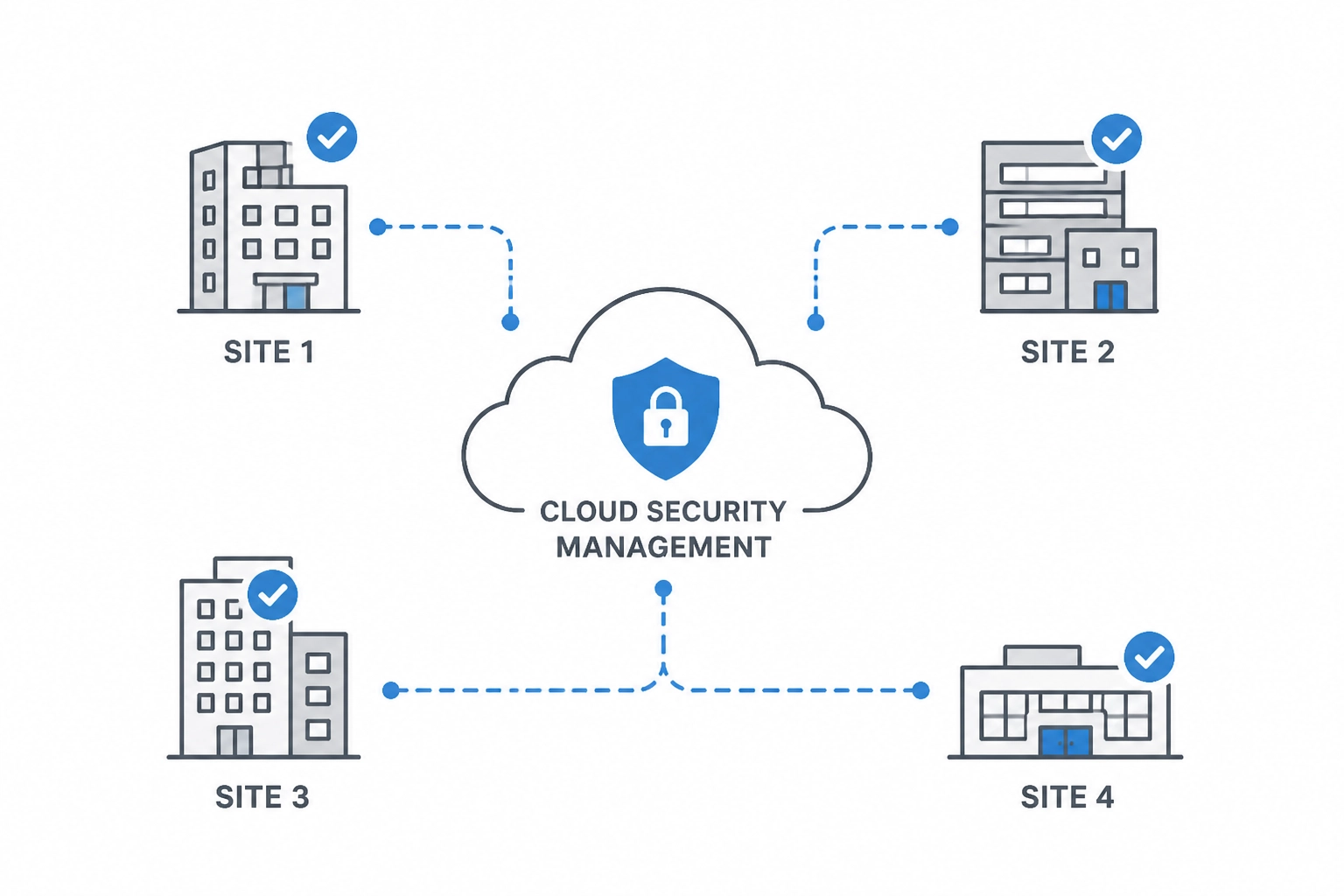
cloud-security-schematic

Choosing a Commercial Security Partner for Multiple Sites

How do you choose a commercial security partner?
Choose a commercial security partner that can standardize your locations, coordinate with your IT team, and provide accountable support after installation. Compare network design, access control, video, documentation, training, and the cost of adding your next site.

As an IT Director or Facilities Manager, you are not looking for more dashboards to stare at. You are not looking for more vendors to manage. And you definitely are not looking for another system that promises "visibility" but really creates more noise, more alerts, and more responsibility on your plate.

You already own too much.

You manage infrastructure. You handle uptime. You support users. You think about compliance, continuity, and risk. In many organizations, physical security gets added to that list almost by accident. Suddenly, cameras, doors, credentials, video retention, audit trails, alarms, locksmith needs, and fire life-safety issues all land on your desk.

That is exactly why choosing the right commercial security partner matters so much.

At Alen Security, we believe your security system should help you do your job, not become your job. That idea drives everything we design, install, and support. We build systems for busy professionals. We do not believe the best use of your time is sitting in front of a wall of monitors watching live video all day. That model is inefficient, expensive, and unrealistic for most businesses.

KEY TAKEAWAYS

  • Choose a partner, not just a product supplier. Long-term accountability matters more than a one-time installation.
  • Standardize across sites. Consistent naming, permissions, reporting, and retention settings make support and compliance easier.
  • Protect the network as well as the building. Cloud and hybrid systems should support remote management without requiring inbound open firewall ports.
  • Centralize administration. One coordinated environment reduces overhead and helps you maintain control across multiple locations.
  • Use analytics and automation to reduce manual monitoring. Smart alerts and searchable events are a better fit for busy teams than constant live viewing.
  • Plan for growth. Scalable design prevents rework when you add locations, users, cameras, and doors.

Instead, we focus on practical outcomes:

  • Advanced analytics that help detect meaningful events.
  • Proactive notifications that tell you when action is needed.
  • Smart automation that handles routine responses.
  • Centralized tools that let you manage multiple locations without jumping between platforms.
  • Standardized system design that simplifies support, reporting, training, and compliance.

That approach creates something every overstretched IT Director and Facilities Manager wants more of: control without constant supervision.

If you are evaluating providers for a retail chain, warehouse network, office portfolio, healthcare environment, school campus, distribution operation, or growing multi-location business, this long-form guide will help you make a better decision. It is built around the practical qualities that matter most in the field: a partner who builds real relationships, brings disciplined standardization, protects your environment with a truly secure architecture, gives you centrally managed control, applies hard-earned experience, delivers consistent quality, supports future growth with scalable design, and keeps the day-to-day experience simple enough to run under pressure.

These ideas are not abstract values. They are decision criteria. They affect how fast you can respond to incidents. They affect whether your cloud system creates unnecessary cybersecurity risk. They affect whether your team can generate a clean audit trail under pressure. They affect whether adding a new site is easy or painful. And they affect whether your security investment delivers peace of mind or ongoing frustration.


Why does choosing a commercial security partner feel harder than it should?

Because most businesses are not just buying cameras or door readers. They are choosing a long-term operating model that affects compliance, cybersecurity, investigations, support, and accountability across every location.

The commercial security industry has a reputation for complexity for a reason. Too many projects are sold as disconnected products instead of complete business systems.

One company handles cameras. Another handles access control. A third handles alarms. A fourth handles locksmith work. A fifth handles fire alarm inspections. A sixth "helps" with remote access. Then, when something fails, everyone points at someone else.

That is not a technology problem. It is a partnership problem.

The right security company should not just install equipment. They should reduce vendor sprawl, align systems with your operational goals, and give you a clear, accountable path from planning through support. When you are responsible for multiple sites, multiple stakeholders, and multiple compliance requirements, that level of accountability is not optional.

This is why the best buying decision is rarely about who has the cheapest camera or the flashiest mobile app. It is about whether the provider can help you create a security program that is secure, standardized, manageable, and sustainable.

And for multi-site businesses, the stakes are higher than they first appear.

A commercial security system is not just a set of devices. It becomes part of your operating model. It affects employee entry, visitor handling, incident response, loss prevention, investigations, compliance documentation, and business continuity. It touches your network. It touches your HR workflows. It touches your maintenance process. In some cases, it also touches legal exposure.

That is why the buying process can feel heavier than it should. You are not simply choosing hardware. You are choosing how accountability will work across sites. You are deciding whether standards will be easy to maintain or impossible to enforce. You are deciding whether remote visibility will be convenient and secure, or convenient but risky. You are deciding whether your next three years will be calmer or more chaotic.

The best security partners understand that pressure.

They know your business value goes far beyond the numbers on a quote. They know a missed door event can become an HR issue. They know a weak audit trail can become a compliance issue. They know a poorly deployed camera can become a liability issue. They know a cloud connection designed the wrong way can become an IT issue.

So the real question is not simply, "Who can install this system?"

The real question is, "Who can help us safeguard our people, restrict risk, standardize operations, and prevent this system from becoming another burden?"

That is the lens this guide uses.


Should you use one commercial security partner or multiple vendors?

For most multi-site businesses, one accountable partner is the better choice. It reduces vendor sprawl, shortens troubleshooting, improves consistency, and gives you a clearer path from planning through support.

Relationships matter because physical security is an operational system that touches your buildings, your network, your employees, your visitors, and your compliance posture. If the provider disappears after install, your team is left managing the gaps.

A strong security relationship gives you:

  • A team that understands your environment and history.
  • Better continuity across upgrades, expansions, and service calls.
  • Faster issue resolution because the provider already knows your standards.
  • Less time repeating yourself to different contractors and help desks.
  • More confidence that problems will actually get solved.

At Alen Security, this is why we emphasize end-to-end service. We consult. We design. We install. We maintain.

CONSULT. DESIGN. INSTALL. MAINTAIN.

That matters in practical ways. If your access-controlled opening is having issues, the problem may involve credential rules, reader behavior, door hardware, power, network connectivity, or physical alignment. When those responsibilities are fragmented, support gets messy fast. When they are coordinated by one accountable partner, your life gets easier.

Strong relationships also create strategic value. Over time, a true partner helps you make better decisions about lifecycle planning, standards, and future growth. They can help you answer questions like:

  • Should this next site be cloud, on-premise, or hybrid?
  • Can we reuse any legacy infrastructure without introducing risk?
  • Which locations need higher-priority upgrades?
  • Where are we overcomplicating policy or support?
  • How do we maintain consistency as we grow?

If a security company treats your project like a transaction, expect transactional results. If they treat it like a long-term operational partnership, you get better accountability and better outcomes.

This is where relationships become more than a soft concept. They become a performance advantage.

When your partner knows your naming standards, your network policies, your credentialing rules, your compliance expectations, and your internal stakeholders, projects move faster. Service calls get shorter. Expansion gets easier. Decisions become less reactive. Instead of re-explaining your environment every time something changes, you work with a team that already understands the context.

That is especially important for multi-site businesses. A regional retailer, warehouse operator, or distributed office portfolio does not need six different local opinions and six different ways of doing things. You need consistency backed by people who know your environment well enough to protect it.

Real partnership also creates trust during uncomfortable conversations. Sometimes the right answer is not the cheapest answer. Sometimes the right answer is to replace aging door hardware before it causes recurring downtime. Sometimes the right answer is to phase a project instead of forcing a rushed full rip-and-replace. Sometimes the right answer is to say no to a shortcut that would create cybersecurity or service problems later.

A provider who values long-term relationships will have those conversations honestly.

That matters because your system is not judged on install day. It is judged six months later when an incident happens. It is judged a year later when a site expands. It is judged when HR needs a clean audit trail. It is judged when leadership asks whether your standards are being followed across locations.

A real partner helps you answer yes with confidence.


Why does standardization matter in multi-site commercial security?

Standardization makes security easier to support, easier to audit, and easier to scale. It gives you consistent naming, permissions, retention, reporting, and workflows across every location.

Standardization is one of the most important parts of a strong commercial security program. It is one of the biggest reasons some multi-site environments stay manageable while others become a constant source of confusion.

Without standardization, you end up with:

  • Different camera naming conventions at every site.
  • Different badge formats and permission groups.
  • Different retention settings.
  • Different alert rules.
  • Different hardware generations with different support needs.
  • Different reporting expectations depending on who installed what.

That may sound manageable when you have two or three locations. It becomes a real problem when you have ten, twenty, or fifty.

Standardization gives you operational leverage.

For example, when an HR termination happens, standardized access control rules make it easier to revoke access consistently across all locations. When a compliance issue arises, standardized retention settings and standardized audit trail workflows make it easier to produce records. When a new facility opens, standardized templates reduce deployment time and training time.

This is also where central management becomes more useful. A centralized dashboard is only powerful if the underlying environment is structured well. If every site is configured differently, central management becomes a prettier way to view chaos.

At Alen Security, we help customers create standards around:

  • Camera placement and naming.
  • Door group structure and schedules.
  • Access levels and user roles.
  • Retention policies and export practices.
  • Alerting thresholds and notification workflows.
  • Hardware selection by use case.
  • Expansion planning for future sites.

Standardization is not about making every building identical. It is about creating enough consistency that your systems stay understandable, supportable, and defensible.

That matters for uptime. It matters for onboarding. And it matters for audit readiness.

For busy teams, standardization is one of the fastest ways to reduce friction without reducing capability.

Think about what happens when a location manager reports an issue. If every site uses a different naming structure, different device mix, different credential rules, and different reporting expectations, your team spends its time translating. Translation is wasted effort. It slows support. It creates mistakes. It weakens accountability because no one is sure whether Site A is supposed to work like Site B.

A standardized environment fixes that.

It gives you common language. It gives you repeatable workflows. It gives you cleaner training. It gives you more reliable escalation. It also gives you a stronger compliance posture because your audit trail is not dependent on each location improvising its own process.

This matters in industries with strict operational expectations. Warehouses need consistent restricted-area access. Retail chains need repeatable store opening and closing workflows. Multi-tenant offices need structured credential management. Distribution centers need camera coverage that follows the same logic from site to site so investigations are not reinvented every time.

It also matters financially.

Without standards, every site becomes a small custom project. Custom projects cost more to support. They cost more to document. They cost more to troubleshoot. They often cost more to expand. Standardization protects your investment by making future decisions easier.

That is one reason we talk so much about simplicity. Simplicity does not happen by accident. It is often the result of disciplined standardization done well.


Should cloud security systems require open firewall ports?

No. Modern cloud and hybrid security systems should deliver remote visibility and control without requiring inbound open firewall ports that expand your attack surface.

This pillar deserves extra attention.

Modern physical security systems are connected systems. Cameras are IP endpoints. Access control platforms live on your network. Cloud management touches identity, devices, logs, and remote administration. That means your physical security platform can either support your cybersecurity posture or undermine it.

The wrong design can create risk fast.

When evaluating a provider, ask a simple question: Does your cloud access or cloud video solution require inbound open firewall ports?

If the answer is yes, keep digging.

Busy IT professionals do not want to punch holes in the firewall just to make a security product work. And they should not have to. Cloud convenience should not come at the cost of increased exposure. Secure remote connectivity should be designed to reduce attack surface, not expand it.

At Alen Security, we strongly emphasize solutions that do not require inbound open firewall ports for cloud access control or cloud video workflows. That supports a cleaner, more secure architecture while still giving authorized users the remote visibility and administrative control they need.

That is a practical security advantage.

It means:

  • Less unnecessary external exposure.
  • Better alignment with modern IT security expectations.
  • Fewer exceptions for your team to defend internally.
  • Stronger confidence that your physical security tools are not creating cyber liabilities.

Security also includes device health and lifecycle management. Ask your provider:

  • Are the products NDAA compliant where appropriate?
  • How are firmware updates handled?
  • How are vulnerabilities monitored and remediated?
  • What logging is available for administrative actions?
  • How is user access controlled and audited?
  • What happens when devices go offline or fall behind on updates?

A good security integrator should be comfortable having this conversation with your IT team. If they only want to talk about resolution, frame rates, and card readers, they are missing the bigger picture.

Physical security should not be the back door into your environment. It should be designed to safeguard people and property without weakening network security.

This is where being secure has to mean more than encrypted marketing language.

It should mean the architecture respects your IT policies. It should mean remote access is thoughtfully designed. It should mean permissions are controlled, administrative actions are logged, and devices can be maintained without guesswork. It should mean your provider understands that every connected camera, controller, and appliance becomes part of a broader risk conversation.

That is why security and quality are closely tied together. A poor install is not just messy. It can create unmanaged devices, inconsistent configurations, weak documentation, and avoidable exceptions that put your team in a difficult position later.

A secure design also supports faster incident response. When you know who has access, what changed, when it changed, and where to find the relevant logs, you are in a much stronger position to investigate issues. That is the value of a clean audit trail. It is not just a compliance phrase. It is the record that helps you establish accountability under pressure.

And just as important, secure design should not make the system harder to use. The right partner protects the environment and keeps the experience simple enough for daily operations.

That balance matters.


What are the benefits of centrally managed security for multiple locations?

Centrally managed security helps you control users, doors, video, schedules, and reporting across all sites from one environment. That reduces overhead, improves response time, and keeps standards consistent.

Central management is one of the biggest quality-of-life improvements a modern commercial security program can deliver.

If your team is managing separate systems at each site, the overhead adds up fast. Different logins. Different video interfaces. Different badge workflows. Different support paths. Different reports. Different procedures when something goes wrong.

That model does not scale.

A centrally managed environment allows you to:

  • Administer users across multiple sites from one interface.
  • Revoke or change credentials quickly across the organization.
  • Review events without physically going to each location.
  • Standardize permissions, schedules, and reporting.
  • Support regional and nationwide operations more efficiently.
  • Reduce the time it takes to investigate incidents.

This is especially important for retail, distribution, and portfolio-style businesses. If you are responsible for dozens of doors and hundreds of cameras across multiple states, fragmented management becomes its own operational risk.

But central management should not be confused with central babysitting.

This is where we need to be clear: we do not believe busy professionals should spend their day watching live video feeds.

That old-school model sounds reassuring, but in most commercial environments it is not realistic and it is not efficient. The better model is event-driven awareness.

That means your system should help surface what matters through:

  • Motion and object analytics.
  • Smart search tools.
  • Exception-based notifications.
  • Door held open alerts.
  • Access denied trends.
  • Unusual after-hours activity flags.
  • Camera health notifications.
  • Automated reporting.

Instead of forcing you to stare at screens waiting for something to happen, the system should tell you when an event meets the threshold for attention. That is a much better fit for how real IT Directors and Facilities Managers work.

You should be able to focus on your job while the system handles the routine monitoring layer in the background.

That is what central management looks like when it is designed for real operations.

For multi-location organizations, being centrally managed is not a luxury. It is how you preserve control as the footprint grows.

Without central administration, every task takes longer. New hires require site-by-site updates. Terminations require manual cleanup in multiple places. Incident reviews become scavenger hunts. Reporting becomes inconsistent. Even small tasks expand into process overhead because the environment is fragmented.

Central management changes that. It gives you one place to restrict access, review activity, confirm policy, and maintain standards. It supports accountability because more actions are visible and easier to verify. It supports relationships because your provider can support the whole environment instead of treating each location like an isolated exception.

And when the system is paired with smart analytics, central control becomes more powerful.

You do not need people parked in front of screens. You need the platform to surface meaningful exceptions. You need health alerts when a device goes offline. You need notifications when a door is held open too long. You need searchable video and event data that lets you move from question to answer quickly.

That is a much more disciplined model than manual screen monitoring.

It protects attention, which is one of the scarcest resources your team has.


Why does experience matter when choosing a commercial security integrator?

Experience helps a provider anticipate real-world issues before they become expensive problems. It improves planning, modernization, deployment quality, and long-term support.

Experience matters because security systems live in the real world, not in the demo room.

Buildings have quirks. Networks have constraints. Users have habits. Weather matters. Traffic flow matters. Shift schedules matter. Local code matters. Existing infrastructure matters. Growth plans matter.

A provider with decades of experience sees these issues early. They ask better questions. They recognize patterns faster. They know when a low-cost shortcut will create a high-cost problem later.

At Alen Security, our 50+ years of experience are not just a number. They show up in practical decisions every day:

  • Designing systems that work in demanding commercial environments.
  • Recommending hardware that holds up over time.
  • Coordinating disciplines like video, access, intrusion, locksmith work, and fire systems.
  • Anticipating support needs before they become emergencies.
  • Helping customers balance capital cost, operating cost, and long-term maintainability.

Experience is especially valuable when you inherit an outdated or inconsistent environment. Many IT and facilities leaders do not get to start from scratch. They inherit old DVRs, unsupported cameras, different badge systems, unreliable door hardware, inconsistent user permissions, and compliance concerns that have been building for years.

That is where an experienced partner can bring order.

They can help you decide what should stay, what should go, what can be integrated temporarily, and what needs immediate replacement. They can help you prioritize risk instead of trying to replace everything at once. And they can help you create a realistic roadmap, not just a wish list.

Experience gives you confidence that the provider has solved problems like yours before.

In commercial security, experience protects you from learning the hard way.

An inexperienced provider may be able to sell a platform. That is not the same as understanding how to deploy it cleanly across real buildings with real constraints. They may not spot the wiring problem that will hurt reliability later. They may not anticipate how a warehouse environment changes camera selection. They may not understand how credential policies need to work differently for executives, contractors, temporary staff, and regional managers. They may not coordinate properly with locksmith work, door hardware, intrusion, or fire alarm obligations.

Those gaps add up.

Experience also matters during modernization. Most organizations are not starting from a blank page. They are living with a mix of old and new. They may need to phase capital spending. They may need to preserve uptime during migration. They may need to support a business opening schedule while systems are upgraded in the background.

That is where decades of field experience are valuable. An experienced partner can sequence work properly. They can flag dependencies early. They can prevent a rush to deploy technology that looks good in a demo but creates friction in the field.

That practical judgment is easy to overlook during procurement. It becomes obvious later.

When a provider has seen enough environments, they stop designing for the sales presentation and start designing for the operating reality. That is the kind of experience that creates peace of mind.


What does quality look like in a commercial security installation?

Quality means more than hardware. It includes clean design, proper camera placement, reliable door hardware integration, stable network coordination, documentation, testing, training, and responsive support.

Quality is not only about which brand of camera gets installed. It is about the total system.

A high-quality commercial security deployment includes:

  • Clean, intentional design.
  • Proper hardware selection for the use case.
  • Thoughtful camera placement.
  • Reliable door hardware integration.
  • Good documentation.
  • Tested workflows.
  • Clean cable management.
  • Stable network integration.
  • Clear end-user training.
  • Responsive service after go-live.

Poor quality shows up everywhere. Cameras placed too high to capture useful detail. Doors that look "installed" but do not close consistently. Credentials that are hard to manage. Alerts that trigger too often to be trusted. Incomplete documentation. Messy support handoffs.

Quality also affects adoption. If the system is unreliable or confusing, your team stops trusting it. Then you lose one of the most important benefits of a modern security platform: confidence.

That is why we take an end-to-end view of quality. It should be evident from consultation through ongoing support. The quality of the install affects the quality of the data. The quality of the data affects the quality of the analytics. And the quality of the analytics affects whether your team gets useful notifications or just noise.

This is one more reason we do not promote a "watch live video all day" philosophy. If your only operational strategy is constant manual observation, you are compensating for weak system design. A quality system should help automate awareness through reliable events, smart analytics, and clean workflows.

In short: quality is not an upgrade. It is the difference between a system that helps and a system that drains time.

For us, quality is tied directly to trust.

If cameras do not capture usable detail, you do not trust the footage. If the access control workflow is clumsy, you do not trust the permissions. If door hardware fails inconsistently, you do not trust the opening. If alerts are noisy and poorly configured, you do not trust the event feed. And when trust drops, people start creating workarounds.

Workarounds are dangerous.

They lead to badge sharing. They lead to manual logs. They lead to unsupported remote access habits. They lead to delayed investigations because no one is sure where the right data lives. A quality system prevents those behaviors by making the right process the easiest process.

That is why quality also includes documentation, training, and service. The install is only one moment in the system lifecycle. The real test is whether the system continues to perform, whether your team knows how to use it, and whether support is responsive when conditions change.

Quality protects uptime. It protects accountability. It protects the credibility of the entire security program.

And for multi-site businesses, quality must be repeatable. A single flagship location with a polished install does not solve the bigger challenge. You need consistent quality across the whole footprint so every site supports the same standard of confidence.


How do you choose a commercial security system that can scale?

Choose a system with repeatable standards, centralized management, secure architecture, and workflows that can expand without forcing a redesign every time you add a new location.

Scalability is not just about whether the software can technically support more devices. It is about whether your people, processes, and support model can support growth without multiplying friction.

A scalable security program should let you:

  • Add locations without reinventing policy.
  • Add doors and cameras without rebuilding administration.
  • Add users without creating permission chaos.
  • Expand reporting without complex manual work.
  • Preserve standards as the footprint grows.
  • Support remote management across regions.

This is where the eight pillars work together. Scalability depends on relationships, standardization, secure architecture, central management, experience, quality, and simplicity. If any of those are missing, growth gets messy.

For example:

  • If you lack standardization, each new location becomes a custom project.
  • If you lack central management, each new site adds administrative overhead.
  • If you lack simplicity, training burden grows with every expansion.
  • If you lack secure architecture, cloud growth may introduce unacceptable cyber exceptions.
  • If you lack relationship continuity, support quality drops as the environment expands.

We often talk to businesses that started with a few standalone systems because that was "good enough at the time." Then the company added more sites, more employees, more compliance demands, and more risk. Suddenly the original decisions become operational bottlenecks.

A scalable strategy avoids that trap.

Whether you manage a single warehouse today or a regional retail network tomorrow, your security environment should support growth without forcing a total reset.

Being scalable means planning for the next site before it becomes urgent.

That does not mean overbuilding. It means making deliberate decisions now so future growth is not punished later. It means selecting platforms that support expansion cleanly. It means using templates, standards, and permission structures that can be repeated. It means thinking about how reporting, support, and administration will work when the footprint doubles.

Scalability is also about preserving simplicity over time.

Some systems appear affordable because they solve the immediate need at one location. But once you add more sites, they create management sprawl. More interfaces. More manual steps. More local exceptions. More training. More troubleshooting. The real cost shows up later in labor, inconsistency, and slower response.

A scalable design prevents that by creating a framework your business can grow into.

That matters for regional and nationwide retail. It matters for warehouse networks. It matters for office portfolios. It matters for any business that may add locations, change operating hours, expand headcount, or face new compliance obligations.

Growth should not force you to start over.


Why is simplicity important in commercial security systems?

Simple systems are easier to use under pressure. They reduce manual steps, improve consistency, speed up incident response, and help busy teams stay in control without becoming security specialists.

Simplicity is often misunderstood. It does not mean basic. It means usable.

A simple security program can still be highly capable. In fact, the best systems often feel simple precisely because the complexity is handled well behind the scenes.

For a busy IT Director or Facilities Manager, simplicity means:

  • Clear interfaces.
  • Logical permissions.
  • Repeatable workflows.
  • Useful alerts.
  • Fewer manual steps.
  • One accountable support path.
  • Less need to remember site-by-site exceptions.

Simplicity matters during routine operations, but it matters even more during stressful moments. When an incident happens, nobody wants to dig through five systems and three manuals just to export footage or verify a door event. You need clarity.

That is why we build for operational simplicity:

  • Search video quickly.
  • Review meaningful events fast.
  • Produce audit trails efficiently.
  • Manage credentials without confusion.
  • Get notified when intervention is needed.
  • Trust the system to handle the rest.

Again, that means we lean into analytics, automation, and proactive notification instead of requiring constant live monitoring.

DETECT. NOTIFY. RESPOND. RETURN.

That is the rhythm busy professionals need. Detect what matters. Notify the right people. Respond appropriately. Return to the work that actually drives the business.

In a strong commercial environment, simple is not a compromise. It is a design goal.

The right system should reduce the number of decisions your team has to make in the middle of a busy day. It should make common tasks obvious. It should make rare but important tasks manageable under stress. It should help you restrict access, find events, export evidence, and verify actions without needing a specialist for every step.

This is where simplicity and relationships intersect. A provider who knows your environment can help keep workflows clean over time instead of layering on exceptions until the system becomes hard to use.

It is also where simplicity and standardization intersect. Repeatable naming, repeatable permissions, repeatable reporting, and repeatable support paths are what make the environment feel understandable instead of fragile.

And just as important, simplicity supports accountability. If a system is too confusing to operate, important steps get skipped. If it is clear, your team is more likely to follow policy consistently.

Simple systems get used. Used systems create value. That is the point.


Why do advanced analytics matter more than live monitoring?

Network integration and security server rack

Yes. In most commercial environments, analytics, proactive notifications, and smart search are more effective than expecting busy teams to constantly watch live video feeds.

One of the biggest mindset shifts in commercial security is moving from passive recording and manual observation to active intelligence.

Traditional thinking says more screens equal more security. In reality, more screens often just mean more information that nobody has time to process. Most organizations do not have dedicated personnel sitting in front of video walls all day, and even if they did, people are not great at maintaining constant vigilance across dozens of feeds for hours at a time.

That is why we believe smarter systems beat constant watching.

Advanced analytics can help identify:

  • Unusual motion patterns.
  • Loitering in restricted areas.
  • After-hours activity.
  • Vehicle or object attributes.
  • People entering specific zones.
  • Occupancy trends.
  • Access anomalies.
  • Searchable event patterns that speed investigations.

This makes video more actionable.

Instead of asking someone to remember when an incident may have happened, you can search by event type, motion, time window, direction, object trait, or related access event. Instead of waiting for someone to notice a problem live, the system can send a proactive notification when a threshold is met.

This is a better use of both technology and human attention.

For multi-site businesses, that matters even more. If you are responsible for a retail chain, a distribution portfolio, or multiple offices, live monitoring across every site is not realistic. Event-based awareness, centralized search, and automation are.

This approach also improves accountability. When the system is designed around exceptions, analytics, and documented workflows, the resulting audit trail is stronger. You can show what happened, when it happened, what triggered a notification, and how your team responded.

That is operational value. That is compliance value. And that is peace of mind.

This point is worth underscoring because it changes how you should evaluate a partner.

If a provider talks as if security effectiveness depends on people staring at screens all day, they are describing an outdated operating model for most commercial organizations. It sounds reassuring, but it usually creates labor cost, alert fatigue, and false confidence. Human attention is limited. Even well-intentioned teams miss things when they are asked to watch too much for too long.

Intelligent analytics are different.

They help the system do the first layer of work. They flag anomalies. They accelerate searches. They connect related events. They reduce the time between an incident and a response. They also make your environment more defensible because actions are based on defined thresholds and documented activity, not vague recollection.

That does not mean people are removed from the process. It means people are reserved for the moments that actually require judgment.

That is a far better model for a time-poor IT Director or Facilities Manager.

You should not have to babysit your system to get value from it. The system should help deter, detect, restrict, and prevent while giving you the confidence that the right information will surface when needed.

That is what modern commercial security should look like.


How do you evaluate a commercial security partner?

If you are comparing vendors, ask questions that map directly to the operating realities above, not just the feature sheet.

RELATIONSHIPS

  • Will you be our long-term support partner or just the installer?
  • Do you use sub-contractors for key parts of the job?
  • Who owns the outcome when something fails?
  • How do you stay aligned with our internal stakeholders over time?

STANDARDIZATION

  • How do you help multi-site customers create consistent naming, permissions, and reporting?
  • Can you standardize new sites using templates and repeatable workflows?
  • How do you support audit trail consistency?
  • What standards do you recommend across cameras, doors, schedules, and user roles?

SECURE

  • Do your cloud video and cloud access solutions require inbound open firewall ports?
  • How do you handle firmware updates and vulnerability response?
  • What cybersecurity practices are built into your design approach?
  • How do you protect remote administration without weakening our network posture?

CENTRALLY MANAGED

  • Can we manage users, doors, schedules, video, and reporting from a single platform or coordinated interface?
  • How do you support remote administration across multiple locations?
  • How do you reduce alert noise?
  • How do you help teams investigate incidents across sites without switching tools constantly?

EXPERIENCE

  • How long have you been serving commercial clients?
  • What types of environments have you deployed in?
  • How do you approach modernization when legacy systems are involved?
  • What have you learned from similar multi-site projects that would apply to us?

QUALITY

  • What does your install and testing process look like?
  • How do you document the final environment?
  • What makes your workmanship and support different?
  • How do you validate that analytics, notifications, and workflows are tuned correctly before handoff?

SCALABILITY

  • How does this system handle additional sites, users, doors, and cameras?
  • Will we need to redesign our environment when we grow?
  • How do you help customers plan for phased expansion?
  • How do you preserve standards as more locations come online?

SIMPLICITY

  • How intuitive is the administrative workflow?
  • How much training will our team need?
  • How do you ensure the system helps busy professionals instead of creating more overhead?
  • How do you reduce the number of manual steps required for common tasks?

A provider who can answer these questions clearly is far more likely to deliver a system that works in the real world.

And pay close attention to how they answer, not just what they answer.

Do they sound like they understand operations, compliance, and support? Do they speak comfortably about both physical security and network security? Do they understand that your team needs visibility without complexity? Do they naturally talk about accountability, repeatability, and lifecycle planning?

Those signals matter.


What should the right security partner deliver?

By the end of your evaluation, the right commercial security partner should be able to deliver a clear picture of how they will help you:

  • Protect people, property, and operations.
  • Avoid unnecessary cyber exposure.
  • Centrally manage multiple sites.
  • Standardize workflows for compliance and support.
  • Reduce vendor sprawl.
  • Use analytics and automation instead of relying on nonstop live monitoring.
  • Scale with your business.
  • Keep day-to-day administration simple.

That is the real goal.

Not more complexity. Not more screens. Not more noise.

More control. More confidence. More accountability. More time back.

A strong partner should also be able to show you how all of those benefits work together.

Relationships make service and planning smoother. Standardization makes support and compliance easier. Secure architecture protects your network without taking away flexibility. Central management reduces overhead across the footprint. Experience helps you avoid expensive mistakes. Quality creates trust in the system. Scalable design protects future growth. Simplicity makes the whole environment easier to run.

That is how a security program becomes sustainable.

It stops being a patchwork of products. It becomes an operating system for protection, accountability, and peace of mind.

For busy leaders who inherited physical security on top of everything else, that is the outcome that matters most. You do not need more moving parts. You need one trusted partner who can simplify the environment, protect the business, and help the system quietly do its job in the background.

That is what good commercial security should feel like.


What do the best commercial security partners consistently get right?

CapabilityWhy It Matters To You
Strong relationshipsYou get a trusted partner who knows your environment and stays accountable over time.
Standardized deliveryConsistency across sites improves support, training, compliance, and audit trail quality.
Secure architectureCloud access and video should not require inbound open firewall ports that increase exposure.
Centralized managementOne interface and one strategy reduce friction across multiple locations.
Proven experienceDecades of real-world delivery help prevent mistakes and support better decisions.
High-quality executionBetter design, installation, documentation, and service produce stronger long-term results.
Scalable designThe system can grow with your footprint without creating new management problems.
Operational simplicityBusy professionals need useful alerts, intuitive workflows, and less manual oversight.

If you remember nothing else from this guide, remember this: the right commercial security partner helps you create an environment that is secure, manageable, repeatable, and ready for growth. They help you safeguard the business without overwhelming the people responsible for running it.


FREQUENTLY ASKED QUESTIONS

Keep it simple. You want a partner that reduces complexity while improving control. The big things to look for are strong relationships, standardization across sites, secure cloud architecture that does not require inbound open firewall ports, centralized management, proven experience, quality delivery, scalability, and simplicity.

Why are relationships so important in commercial security?

Because physical security is not a one-time purchase. It becomes part of your day-to-day operation. A strong partner understands your sites, standards, and priorities over time, which leads to faster support, clearer accountability, and fewer gaps between design, installation, and service.

How does standardization help multi-site businesses?

Standardization creates consistency across camera naming, user roles, access levels, retention settings, alert workflows, and reporting. That makes training easier, support faster, new site deployment smoother, and audit trail requests easier to handle.

Why does Alen Security emphasize that cloud systems should not require open firewall ports?

Because cloud convenience should not come with extra network exposure. Solutions that do not require inbound open firewall ports help reduce attack surface while still giving authorized users secure remote visibility and management.

What does centrally managed security actually look like in practice?

It means you can manage users, credentials, doors, schedules, video, and reporting across multiple locations from one coordinated environment. That cuts site-by-site overhead, improves response speed, and helps keep standards consistent as you grow.

Why does Alen Security focus on analytics and notifications instead of expecting customers to watch live video all day?

Because most busy professionals do not have time to sit in front of screens waiting for something to happen. Advanced analytics, proactive notifications, and smart automation help surface the events that matter so you can respond when needed and get back to your real work.

How does experience improve the outcome of a commercial security deployment?

Experience helps a provider spot real-world issues early, recommend durable solutions, work around inherited limitations, and design systems that hold up over time. That helps prevent costly mistakes during planning, installation, modernization, and support.

What does quality mean in a commercial security system?

Quality is more than hardware. It includes system design, camera placement, door hardware integration, network coordination, documentation, testing, training, and post-install support. A quality deployment is easier to trust, easier to use, and less likely to create recurring service problems.

Why is scalability important even for companies with only a few sites today?

Because growth can happen fast. A scalable system lets you add locations, users, doors, and cameras without rebuilding your standards, changing your management model, or creating more admin work later.

What makes Alen Security a fit for busy multi-site organizations?

We design commercial security systems around simplicity, accountability, and long-term performance. With over 50 years of experience, end-to-end service, centralized cloud and hybrid options, strong cybersecurity priorities, advanced analytics, and support for video, access, intrusion, locksmith, and fire alarm needs, we help busy teams stay protected without turning security into a full-time job.


Discuss your sites with a commercial security partner

Stop juggling multiple vendors and outdated systems. You have enough on your plate. Let us simplify your security so you can focus on the rest of your job while the system helps handle the routine work.

CONSULT. DESIGN. INSTALL. MAINTAIN.

Discuss your commercial security needs with Alen Security

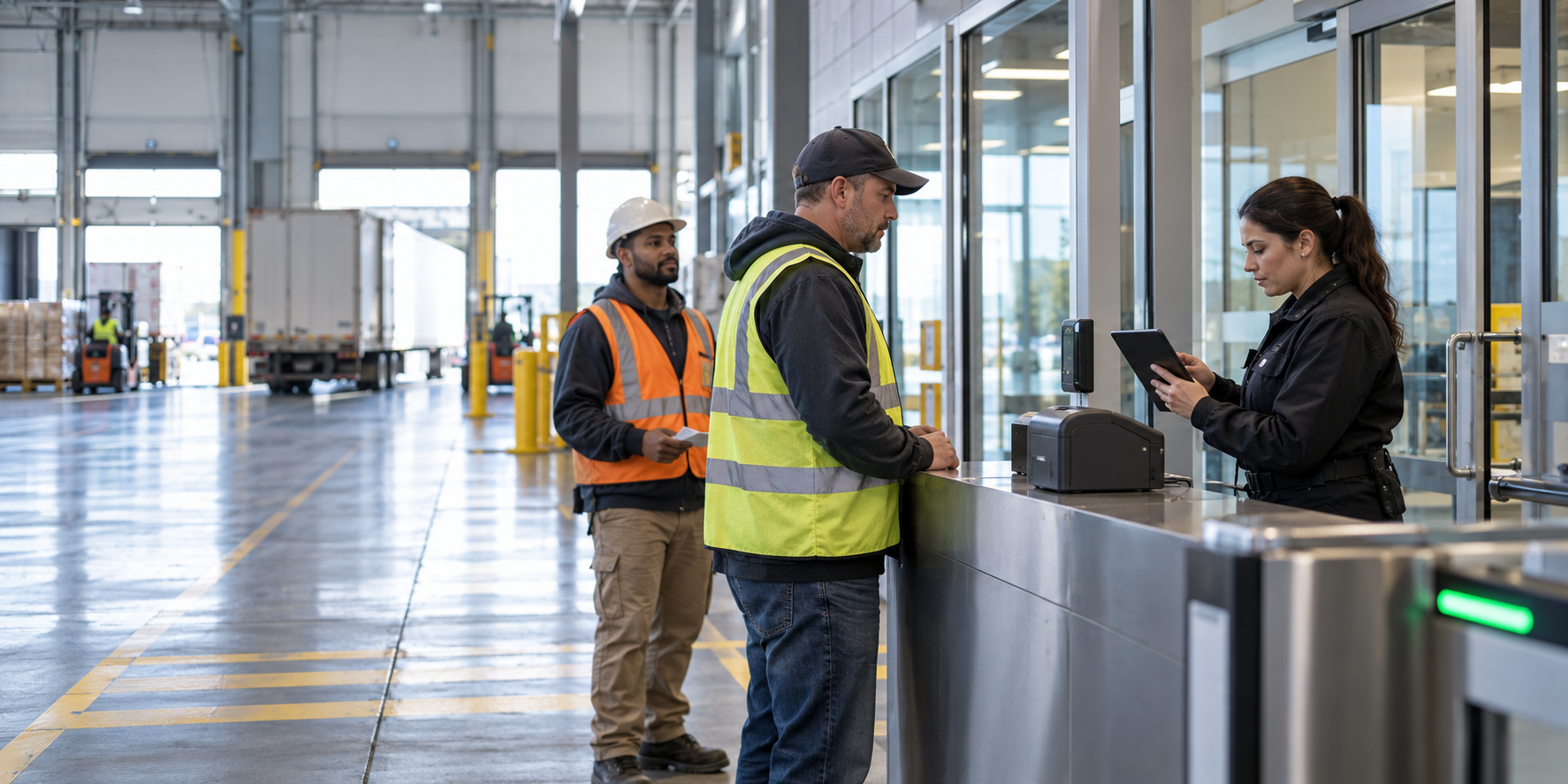
Warehouse visitor management check-in for delivery drivers and contractors at a distribution center

Enterprise Visitor Management System for High-Volume Warehouses and Distribution Centers

Warehouse visitor management has to work at production speed. Most warehouses are not managing one or two visitors a day. They are coordinating delivery drivers, freight partners, maintenance contractors, auditors, temporary workers, and vendors across multiple shifts and multiple gates. A paper log and a wave from the front desk cannot keep up.

A visitor management system gives operations and security a shared view of who is on site, why they are there, what they can access, and when they left. In a distribution environment, the system also has to keep traffic moving. The best experience feels simple for a driver, useful for a host, and dependable for the team responsible for every door.

Warehouse visitor management check-in for delivery drivers and contractors at a distribution center
Controlled visitor check-in can keep a busy distribution center moving without treating every arrival as an employee.

What should a warehouse visitor management system handle?

A warehouse visitor management system should register visitors, confirm their host or delivery purpose, issue the right temporary credential, and record the visit from arrival through departure. It should connect with access control so a visitor can reach the loading area or reception point without receiving broad employee access.

That connection matters because a visitor record by itself does not secure a door. The access system enforces the approved doors and schedule. Video can add context when a delivery arrives at an unusual gate or a credential is used outside the expected area.

For a busy facility, look for a system that can manage:

  • Multiple entrances, gates, and check-in points
  • Drivers, contractors, vendors, auditors, and temporary workers
  • Temporary credentials with a defined start, end, site, and access profile
  • Central reporting across warehouses and distribution centers

The exact hardware and workflow depend on the building. The operating principle stays the same: collect useful information once, apply the access decision consistently, and keep the record available to the people who need it.

Why does office-style visitor management break down?

Many visitor tools assume one lobby, one receptionist, and a modest flow of guests. A distribution center may have trucks arriving before sunrise, contractors working after hours, and drivers who should never pass beyond a staging area. The process has to keep up with that reality.

If every driver waits for a staff member to type the same information into a spreadsheet, the line becomes an operations issue. A well-designed check-in flow can collect the necessary details quickly, notify the right host, and send the visitor to the correct area without making the guard repeat the work.

A badge printed by a visitor system but never connected to access control may tell you who checked in, but it does not stop that person from entering an unrelated door. The credential should carry a narrow permission, a short schedule, and an automatic expiration.

When a customer or auditor asks who entered a cold storage area last month, a stack of paper sheets is difficult to search. A central digital record should show the visitor, company, host, purpose, credential, entry point, exit time, and relevant access events.

The hard part is not collecting a name. It is deciding which arrival needs a quick path and which one needs a closer look. A repeat carrier with an approved delivery appointment is different from an unscheduled contractor asking for access to a mechanical room. If both follow the same long form, the line grows and the security team spends its time on routine entries instead of exceptions.

How does warehouse visitor management handle high-volume check-in?

Start with the arrival patterns. Map the gates, expected arrival windows, host responsibilities, and areas that require a stronger review. Decide which information the visitor can provide, which details a host must confirm, and which exceptions need security approval.

Use self-service where it helps, but keep a human path for visitors who need assistance. A driver may scan a pre-registration code, confirm a delivery number, and receive a credential without waiting for someone to retype the visit. A contractor may need a sponsor, safety acknowledgment, and proof of training before the credential is enabled.

Keep the screen and the questions focused. The goal is to capture enough information to make the access decision and support the record later. When the workflow is clear, the team gets better data and the visitor gets moving.

How should warehouse visitor credentials work?

Visitor credentials should be temporary by design. Give each credential a named visitor, company, host or delivery purpose, approved site, doors, and expiration. If a contractor needs access for several days, record the approved window rather than leaving a badge active until someone remembers to collect it.

Use the smallest access profile that fits the visit. A driver may need the gate, shipping office, and loading area. That does not automatically mean access to employee entrances, offices, server rooms, or inventory areas. A maintenance contractor may need a different profile during a scheduled work window, with a named sponsor who can explain the need.

In warehouse visitor management, the exit is as important as the arrival. At departure, make the return or deactivation step part of the normal process. If the visitor leaves through a different gate, the system should still close the visit and disable the credential. If the platform supports automatic expiration, use it. If it does not, assign a person and a review time.

Consider the handoff between a shift change and a delivery surge. A host may have approved a visit hours earlier, but the person at the gate still needs to confirm the right site, appointment, and access window. If the host is unavailable, the process needs a named backup and a clear escalation path. That is the difference between a policy that sounds good in a meeting and one that works at 5:30 in the morning.

How can multiple sites share one visitor process?

Central management makes a multi-site program easier to operate, but only when the sites use shared rules. A visitor type called “Driver” should mean the same thing at each distribution center. The same is true for contractor sponsors, temporary access windows, restricted areas, and report names.

Set the common policy centrally, then document the local differences. One site may have a guardhouse and another may use a lobby kiosk. One may have a separate cold storage area while another has a high-value cage. The workflow can account for those differences without creating five unrelated systems.

If your sites already struggle with inconsistent access groups, our guide to standardizing access control across different locations explains the groundwork that makes visitor permissions easier to repeat. Central visibility also improves support. When a site manager calls about a missing badge or an unexpected access event, the service team should be able to see the visitor record, credential status, and relevant door activity from one place. Alen Security helps clients standardize the hardware, access groups, and service path so a new warehouse can fit the operating model.

Standardization does not mean every building has identical doors. It means the access decision is made the same way. Your sites can share visitor types, approval roles, credential expiration rules, and report fields while allowing for a guardhouse at one property and a staffed lobby at another. That makes onboarding a new facility and supporting an existing one much less dependent on local memory.

What should security and operations monitor?

Look for credentials that remain active after a visit, visitors who repeatedly use an unexpected gate, contractors without a current sponsor, and visits that stay open long after the expected departure.

Review the physical behavior too. A held-open door, forced-door event, or offline controller can change the meaning of an otherwise clean visitor record. The same review discipline described in our multi-site physical access audit applies to temporary credentials too. Video connected to access events can help clarify what happened at a priority opening. Assign each finding to the team that can fix it.

How do you protect the network connection?

A warehouse visitor management system often touches kiosks, readers, controllers, printers, cloud services, and the company network. Use individual administrator accounts, multifactor authentication where available, and a clear record of who can change visitor rules or access profiles.

Alen’s approach avoids unnecessary open ports and firewall holes. Standardized configurations make troubleshooting faster and reduce the chance that one site is quietly running a weaker setup than the others.

Keep the visitor platform and the access-control network in the same security conversation. Ask who owns software updates, how a lost tablet is handled, which people can edit access profiles, and what happens when connectivity drops. A cloud-managed system can make central oversight easier, but the local controller behavior and offline plan still need to be tested at the actual doors.

What does a successful warehouse deployment look like?

A successful deployment starts with a site assessment. Walk the arrival points, loading areas, employee entrances, restricted rooms, and network paths. Document how visitors arrive today, where the process slows down, and which access decisions are being made informally.

Choose a representative site or gate for a pilot. Test the visitor flow at a busy time, confirm that credentials open only the intended doors, verify that expiration works, and make sure the reports answer the questions operations and security actually ask. Once the pilot works, standardize the configuration and roll it out in phases.

What should you ask before choosing a system?

Keep the evaluation grounded:

  • Can it handle our busiest gates without creating a line?
  • Can temporary credentials be limited by site, door, schedule, and expiration?
  • Can our team see visitor activity across every location from one place?
  • Can it connect with access control, video, identity, and reporting workflows?
  • Who supports the system after installation?

Ask the vendor to walk through three real scenarios: a scheduled carrier during a shift change, an unscheduled service technician, and a visitor who leaves through a different gate. Watch what the guard sees, what the host approves, what doors open, and what the final report says. Then test the same scenarios at a second site. The demo should expose the manual work, not hide it behind an idealized front desk.

The best warehouse visitor management choice fits the way the facilities actually operate. A system that looks impressive in a demo but requires manual work at every gate will not deliver the experience the team needs.

Make visitor access easier to manage

High-volume warehouses need visitor management that respects both security and throughput. People should know who is on site, operations should keep trucks and contractors moving, and security should be able to trace access without reconstructing the day from paper.

Alen Security can assess your gates, visitor workflow, access control, video, network connection, and multi-site support model. Schedule a conversation with Alen to map the first site or the next phase.

Frequently asked questions

What is visitor management in a warehouse?

Warehouse visitor management is the process for recording an arrival, confirming the reason for the visit, approving a limited route through the facility, and closing the visit at departure. In a busy distribution center, it also needs to keep drivers and contractors moving without weakening access decisions at gates, docks, and restricted rooms.

Should visitor badges connect to access control?

Yes. A badge that only displays a name does not control a door. Linking visitor records to access control lets the team assign a specific site, door group, and time window, then expire the credential. Test the connection at a real reader before relying on it during a busy shift.

How long should a visitor credential remain active?

Only for the approved visit or work window. A delivery may need a few hours; a contractor may need a defined multi-day schedule. Use automatic expiration when available, confirm the exit process, and give exceptions a named owner. Do not leave a badge active simply because nobody collected it.

Can one visitor system support multiple warehouses?

Yes. One platform can support multiple warehouses when the organization agrees on visitor types, approval roles, credential rules, reports, and a support path. Local gate layouts can differ. The benefit is a consistent decision and a central view of who is on site, not identical check-in counters everywhere.

What should a warehouse visitor report include?

A useful report identifies the visitor, company, host or delivery purpose, site, credential, arrival point, approved access, entry and exit times, and relevant door events. It should let an authorized manager answer a specific question without stitching together paper logs, video timestamps, and separate badge spreadsheets.

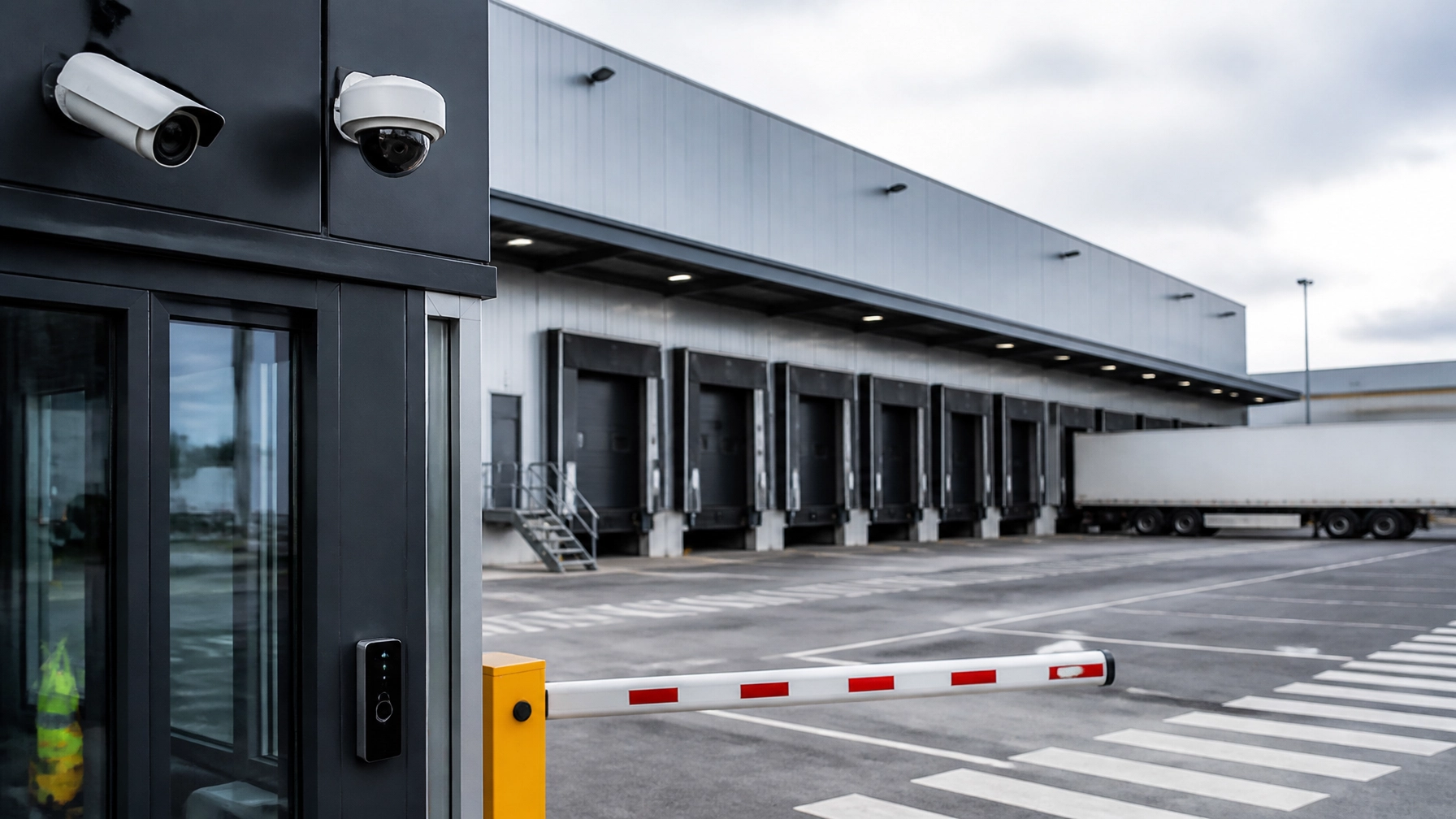
Loading dock security at a distribution center

Loading Dock Security for Distribution Centers

Loading dock security at a distribution center

The loading dock is the busiest, most exposed part of a distribution center. People, vehicles, inventory, and vendors move through it constantly, and when controls are inconsistent, that traffic turns into loss, disputes, and compliance headaches.

For IT Directors and Facilities Managers, that’s a real problem. You need visibility, accountability, and uptime you can count on, without adding another person to watch monitors all day. A well-designed dock security program gives you that: less risk, a documented record of activity, and a way to run one site or fifty from the same standard.

At Alen Security, we help you standardize dock security with IP video surveillance, cloud-based access control, and centrally managed systems built to be secure, scalable, and easy to run.

What is loading dock security?

Loading dock security is a layered approach that combines physical barriers, IP video surveillance with analytics, and cloud-based access control. Together, they prevent cargo theft, unauthorized entry, and workflow disruptions at one of the busiest points in your facility.

Why is the loading dock such a common vulnerability?

Because it’s busy by design. Trucks, vendors, employees, and high-value inventory all move through the same area at the same time. That kind of activity hides tailgating, propped doors, blind spots, and unverified access when your systems are outdated or disconnected.

How do video analytics help without adding more manual work?

Video analytics cut down on the need for someone to watch screens all day. The system flags loitering, detects tailgating, and uses License Plate Recognition (LPR) to check vehicles against schedules, so your team only steps in when something actually needs attention.

How do I secure the perimeter around a loading dock?

Perimeter security starts before a truck reaches the bay. The most effective approach combines gates, fencing, lighting, video coverage, and controlled entry, so every vehicle movement is visible and every access event gets documented.

For a lot of facilities, the real gap is inconsistency. A fence and a paper log look like control, but they don’t give you an audit trail, a searchable record of who entered, when, and what happened around it.

We recommend standardizing the perimeter approach across every location. High-resolution IP cameras, gate controls, and scheduled access permissions work together to verify authorized arrivals and flag exceptions: after-hours vehicles, loitering near the fence line, unscheduled deliveries.

Because these systems are centrally managed, your team reviews activity across every site from one place, no separate software, no local workarounds. That cuts vendor sprawl and gives you one operating standard for security, compliance, and investigations.

How does a no-open-ports architecture protect your network?

A no-open-ports approach cuts the unnecessary exposure between your security system and your corporate network. Instead of relying on port forwarding, which can leave avoidable holes in your firewall, secure cloud platforms use encrypted outbound connections. Your systems stay accessible without opening inbound paths into your environment.

For IT teams, that’s the difference between remote visibility and an open door. You get control without loosening your security posture, which is why cloud-based systems can be simple to manage and secure to deploy at the same time.

How do I manage loading dock security across multiple locations?

Multi-site dock security works best when video, access control, alerts, and reporting live on one platform. A centrally managed system gives you one view across locations, one investigation workflow, and one set of standards for your whole team.

That’s what you need when you’re responsible for uptime and accountability but can’t be on site at every facility. Central management lets you respond faster, verify events remotely, and stay consistent as you add locations.

Why does standardization matter in distribution security?

Standardization improves reliability. When the hardware, user permissions, naming conventions, and reporting structure are consistent, your team spends less time figuring out each site and more time solving actual problems.

It also makes regulatory compliance easier. You can document procedures and pull records cleanly during audits, claims, or internal reviews instead of piecing them together after the fact.

Standardization usually includes:

  • Uniform hardware: Cameras, readers, and locking hardware built for industrial environments.
  • Consistent policies: Role-based access tied to how your sites actually operate.
  • Scalable architecture: A platform that adds bays, buildings, or sites without a rebuild.

What are the most common loading dock security vulnerabilities?

Most loading dock losses trace back to a handful of recurring issues. It’s rarely a lack of activity. It’s a lack of visibility, access discipline, and documentation around that activity.

Here are five issues we see repeatedly in distribution environments.

How do I prevent unauthorized tailgating?

Tailgating happens when a second vehicle or person follows an authorized entry without its own verification. Video analytics and controlled gate logic catch that pattern and send an alert so your team can review it fast.

Every entry ties back to a credential, a vehicle record, or a verified schedule, not a guess. That’s what accountability actually looks like.

How do I address propped doors and door-held-open events?

Dock doors get propped open for convenience during busy shifts more often than anyone wants to admit. Door position monitoring flags doors that stay open past an approved threshold and sends an automated notification with the related video.

Supervisors catch it before it turns into a loss or a safety issue, without walking the floor to check every door themselves.

How do I investigate internal shrinkage or collusion?

Some losses come from process failures or collusion, not forced entry. Searchable video tied to shipment timing, pallet activity, or related transactions gives you the context to investigate exceptions properly.

An integrated record makes claims review and internal investigations faster, and easier to defend when someone asks how you know.

How do I manage vendor access at the dock?

Vendor access should be temporary, specific, and documented, full stop. Cloud-based access control lets you issue scheduled credentials that expire automatically, so vendors get into only the areas and times you approve.

No more tracking physical keys. You get a clear record of who was on site and when.

How do I eliminate blind spots and poor image quality?

Loading docks create tough lighting, bright sun outside, dim bays inside. Cameras with Wide Dynamic Range (WDR) handle both extremes in the same scene, so you keep usable detail at doors, bays, and vehicle approaches instead of blown-out highlights and black shadows.

Placement, lighting, and lens selection matter as much as resolution. Good design is what turns footage into evidence you can actually use in a claim or investigation.

How can analytics support operations as well as security?

Analytics support business decisions too, not just security ones. Dwell time reports show carrier delays. Vehicle counts verify throughput. Safety-related events flag patterns around restricted zones or forklift traffic.

That’s real business intelligence without bolting on a separate system, and it puts operations, facilities, and security on the same data instead of three different spreadsheets.

How does loading dock security support compliance and accountability?

A good dock security system builds a reliable record of access events, alarms, and related video. That record backs up compliance, investigations, and internal reporting, because you can show what happened instead of relying on a handwritten log or someone’s memory.

For distribution centers managing standards like C-TPAT or OSHA documentation, that’s not optional. You need records that are consistent, searchable, and retained long enough to support audits, claims, and incident review.

IDENTIFY. DOCUMENT. VERIFY. RETAIN.

Integrated systems keep a digital audit trail, a time-stamped history tied to doors, credentials, alarms, and video. When an auditor, insurer, or operations leader asks for documentation, your team pulls it in minutes, not days.

How does fire and life safety fit into dock security?

Loading docks combine heavy equipment, vehicle traffic, packaging materials, and electrical devices. Fire and life safety needs to be planned alongside security, not bolted on after.

When fire alarm systems and door hardware are coordinated correctly, doors respond the right way during an emergency, and video still gives you situational awareness. That means safer egress and better information for first responders when it counts.

What does a loading dock security partner actually deliver?

You need more than equipment. You need a system that’s designed right, installed cleanly, documented clearly, and supported over time, not just at the ribbon cutting.

That’s where experience shows. With more than 50 years in commercial security, we help you simplify decisions, standardize systems, and hold the line on quality from design through service.

CONSULT. DESIGN. INSTALL. MAINTAIN.
  1. CONSULT: We review your dock layout, workflows, risks, and compliance needs.
  2. DESIGN: We build a practical solution using reliable, open, scalable technology.
  3. INSTALL: Our team deploys the system with an eye on uptime, safety, and consistency.
  4. MAINTAIN: We provide ongoing service so the system stays dependable as your needs change.

Can I improve loading dock security without replacing everything?

Yes. In most cases, you can modernize in phases. If your existing cameras, door hardware, or network infrastructure still perform, we can integrate them into a newer platform instead of ripping everything out at once.

That means fewer disruptions to your operation now, and an easier expansion later, because you’re building toward one clean, scalable standard instead of patching around old ones.

Why do locksmith services still matter at a loading dock?

Physical hardware still matters. A cloud reader or camera can’t make up for a weak strike, a worn closer, or a door that doesn’t latch every time.

Commercial locksmith expertise makes sure doors, cylinders, electrified hardware, and related components are built for industrial use and work with your electronic system, not against it. That’s what separates a solution that’s actually quality driven from one that just looks good on paper.

Why work with Alen Security on loading dock security?

We build long-term relationships by making security easier to manage and easier to trust. That means clear recommendations, standardized systems, secure architectures, and support that doesn’t disappear after installation.

For facilities and IT teams, the benefit is practical. One partner handles consultation, design, installation, service, and accountability going forward. That’s less complexity for you as your organization grows, not more.

Key Takeaways

  • Loading dock security works best layered: video, access control, physical hardware, lighting, and documented workflows working together, not as separate systems.
  • Centralized management means one platform, one investigation workflow, and one standard across every site, so you’re not managing five sets of tools to cover five locations.
  • A no-open-ports architecture keeps your network protected without giving up remote visibility and control.

Frequently Asked Questions

How do I prevent truck drivers from accessing the warehouse interior?

Put in a driver cage or a dedicated vestibule with cloud-based access control. Drivers check in at the dock without ever reaching the main floor, and cameras with two-way audio let your team talk to them without face-to-face contact.

Can I manage security for multiple warehouses from one mobile app?

Yes. Our centrally managed cloud platforms let you view live video, review access logs, and lock or unlock doors across every location, right from your phone.

What is License Plate Recognition, and do I need it?

License Plate Recognition, or LPR, uses specialized cameras to read and log truck plates automatically. On a busy dock, it speeds up check-in and gives you a searchable record of every vehicle that’s been on site.

How does “No Open Ports” technology protect my corporate network?

Older systems often rely on port forwarding, which can leave holes in your firewall. Our cloud-based approach uses secure outbound-only connections, so your security system stays connected without exposing your internal network.

How long should I keep loading dock video footage?

For logistics and distribution sites, 30 to 90 days is a practical baseline. That window usually covers the period when shipment discrepancies, claims, or investigations actually surface.

Can security systems help reduce workers’ compensation claims?

Yes. Video analytics capture near-miss incidents and verify safety protocol compliance, which gives you real documentation for training, investigations, and reducing liability.

Is cloud-based access control more expensive than traditional systems?

Not necessarily. Upfront hardware costs are usually similar, but cloud systems tend to cost less long term since you’re not maintaining local servers, pushing manual updates, or adding extra IT overhead.

What happens if the internet goes down?

Your system keeps working locally. Cameras keep recording, and access control readers still function off the most recently synced permissions. Once connectivity comes back, everything syncs back to the cloud.

Do I need to replace all my current cameras to get AI analytics?

Not always. In a lot of cases, AI-enabled bridges or recorders can add analytics to your existing IP cameras, and even some analog systems.

Why choose a security integrator instead of a guard service?

A guard can only watch one area at a time. An integrated system covers multiple points 24/7, sends automated alerts, and builds a stronger audit trail, usually at a lower long-term cost.

What should you do next if your loading dock security is inconsistent?

If your dock security is fragmented, outdated, or hard to manage, the next step is a straightforward assessment. We’ll help you identify the gaps, standardize your approach, and build a system that supports compliance, uptime, and accountability, without adding complexity you don’t need.

Ready to see where your gaps are? Schedule a loading dock security assessment through our contact form.

man-logging-inventory-in-warehouse

Why Warehouses & Logistics Companies Need IP Camera Video Surveillance Systems


Identifying the Challenges of Warehouses & Logistics Facilities

These common issues include:

  • Accidental damages to goods and property
  • Theft & shrinkage
  • Workplace safety incidents
  • Misplaced Boxes and Pallets
  • Unlawful access to loading docks and storage areas

Having the right camera system can help you avoid some of these issues, or even document them so you can track what happened and avoid further issues in the future.


What are the Benefits of IP Camera Video Surveillance Systems?

If you have traditional analog cameras installed in your warehouse or facility, you may want to consider upgrading to a more advanced system. IP video surveillance offers quite a bit more in terms of clarity, functionality, and even storage.

Here are some of the added benefits of IP video surveillance systems:

  • High-Definition Clarity: clear visibility in high-definition allows you to see more, allowing you to easily identify faces, labels, and even license plates.
  • Remote Monitoring Capabilities: due to the cloud-based storage and remote functionality, you can easily review the footage while off-site on your smartphone or tablet.
  • Easy Integration: Our IP Video Systems can be integrated with Access control systems giving you a larger spectrum of security on one pane of glass.
  • Advanced Features & Data: these systems offer motion detection and video analytics which allow you to be proactive instead of reactive and the ability to stay on top of what’s happening, alerting you of abnormal activity and potentially critical events; all of this gives you a leg up in your security measures.
  • Easily Scalable: if you plan on expanding your facility, you can easily add additional cameras on your network, giving you a fuller view of the goings on in your facility.
  • Improved Productivity and Efficiency: See what’s happening to help improve productivity in real-time and the mere presence of these cameras is enough to improve team efficiency as well as curb any nefarious ideas of internal theft.


Get Started on Taking Your Facility’s Security Measures to the Next Step with IP Camera Video Surveillance

If you’re looking to reduce risks, theft, breakage, and ensure total efficiency with your facility’s operations, installing IP video surveillance systems can make a measurable difference. When you’re ready to take the next step at improving efficiency and reducing loss and theft, you can look to us at Alen Security.

We can do a walkthrough of your warehouse or facility and determine the best placements for these cameras. We’ll also offer training for anyone needing to access the footage, as well as provide ongoing maintenance and updates to ensure that your IP video cameras are always working and providing you with the details that you need.

Schedule a consultation with Alen Security today.


Frequently Asked Questions

What security challenges do warehouses and logistics facilities commonly face?

Warehouses must manage theft, inventory shrinkage, accidental property damage, workplace safety incidents, misplaced boxes and pallets, and unauthorized access to loading docks or storage areas. Camera footage helps document these events and determine what happened.

How are IP cameras better than traditional analog cameras?

IP cameras provide clearer video, more storage options, remote monitoring, video analytics, and easier system expansion. Their high-definition footage can make faces, shipping labels, and license plates easier to identify.

Can warehouse managers view IP camera footage remotely?

Yes. Cloud storage and remote access allow authorized users to review footage from a smartphone or tablet while away from the facility.

Can IP cameras work with a warehouse’s access control system?

IP video surveillance can be integrated with access control systems. This allows managers to monitor camera footage and access activity together, providing a more complete view of the facility’s security.

Can an IP camera system expand with a growing warehouse?

Yes. Additional cameras can be added to the network as the facility expands. This makes it easier to cover new storage areas, loading docks, workspaces, and other parts of the property.

employees-in-warehouse

Modern Security Solutions for Warehouses & Distribution Centers


Monitoring Warehouse Activity

IP Video Surveillance Systems offer you that coverage and can also help improve productivity. These systems can store the footage locally or in the cloud, which allows you to maximize your storage capabilities and can offer a lower total cost of ownership. Systems using video analytics and AI are also available.

The footage is available locally or even remotely, away from the office, on your smartphone or tablet.


Access Control Systems for Your Warehouse

Securing important items like hard drives, client records, employee files, or even servers is important. However, it’s also key to ensure that these areas are kept secure from those without the proper clearance.

Having Access Control Systems in place can allow you to mitigate any potential risks both internally and externally. You can assign access levels to each user to ensure they only have access to areas they are supposed to and receive audit reporting to see whose credentials were used where and when.

We offer both local and cloud-based systems depending on your application. Management of these systems is easy as well. They are browser-based and do not require any proprietary software that has to be upgraded, lowering your total cost of ownership.


Sufficient Locks & Alarms for Warehouse Security

Locks are the touchstone of security measures, however, they can be bypassed by a skilled operator, so incorporating modern locking devices can mitigate a break-in, but if those are broken through, having an alarm system in place will alert those on-site of the malicious activity.

Our locks and alarms can provide sufficient protection against unauthorized entry. The alarm systems will notify the central station who can then dispatch law enforcement.


Protect Your Warehouse from Fires

A fire can wreak havoc on any facility, but with a warehouse, it could result in the complete  destruction of your inventory, systems, and could pose a major health risk to staff, including death. Having the right Commercial Fire Alarms in place can help you mitigate risks and ensure the protection of your team and staff.

These fire alarm systems can  detect instances of smoke, heat, fire and carbon monoxide and provide up-to-date data on where the alarm occurred, relaying the information to incoming responders to help thwart the spread of the fire.


Ensure Total Warehouse Security By Partnering with a Commercial Security Company

While warehouses and distribution centers play a pivotal role in the supply chain, a mere security threat could wreak havoc with lost or damaged property, stolen data, or even destruction of the facility.

Make sure that your warehouse security measures are up-to-date and reliable by partnering with us at Alen Security. We can conduct an audit of your facility to determine the right systems to put in place to enhance your security efforts.

Get in touch with us at Alen Security to ensure that your warehouse is protected!


Frequently Asked Questions

What security threats should warehouses and distribution centers monitor?

Warehouse security systems can help document employee theft, workplace accidents, altercations, outside threats, and other incidents involving inventory or property. Recorded footage helps managers determine what happened and address similar risks in the future.

How does video surveillance support warehouse security and productivity?

IP video surveillance provides footage of warehouse activity for security reviews and incident investigations. Managers can also use the footage to monitor operations, identify productivity issues, and view activity remotely from a smartphone or tablet.

How do access control systems protect sensitive warehouse areas?

Access control systems allow managers to assign different access levels to employees. This helps restrict servers, employee records, client information, and other sensitive materials while creating reports showing whose credentials were used, where, and when.

Why should warehouses use both locks and alarm systems?

Locks provide the first layer of protection against unauthorized entry, but they can still be bypassed. An alarm system provides a second layer by notifying the monitoring station, which can then dispatch law enforcement when necessary.

What hazards can commercial fire alarm systems detect in a warehouse?

Commercial fire alarm systems can detect smoke, heat, fire, and carbon monoxide. They can also identify where an alarm originated and relay that information to emergency responders.

aisle-of-shelves-in-warehouse

5 Reasons You Need Access Control for Your Warehouse

Access Control Systems are a vital component to your warehouse’s security. There are plenty of benefits to installing a system in your building to ensure that you’re taking proactive measures to ensure that your inventory is protected and that your warehouse security measures are optimal.

At Alen Security, we’re happy to share the five reasons you need access control for your warehouse!


Access Control: Managed Security & Asset Protection

Since you’re storing valuable goods in your warehouse, making sure that they’re protected in enclosed areas of your warehouse is crucial. It reduces the risk of theft and vandalism by restricting access to those who are authorized. It can also limit any unwanted damage that can result in unnecessary costs, allowing you to protect your inventory.


Ensuring Employee Safety

One of the reasons to limit access to certain areas of your warehouse can be due to health and safety. Whether you’re storing volatile chemicals, fragile items, or sensitive materials, limiting access to those who are authorized can reduce any unforeseen risks that could lead to harm to your team members. It can also help in an emergency situation, where an exit through an access-controlled door may be more accessible during an evacuation.


Remain Compliant

No matter the industry you’re in, most have strict regulations regarding the storage and handling of certain types of materials. Having access control systems and proper reporting in place can help you ensure that you’re being compliant with these regulations by limiting access to only authorized individuals.


Improve Your Operational Efficiency & Productivity

By having access control assigned to specific areas of your warehouse, and proper audit reporting in place you can help reduce any unwanted disruptions in your operations, thereby improving productivity while allowing authorized team members to work efficiently with little distraction. It can help maintain a smooth and steady workflow.


Manage Visitations with Access Control

Whether you’re having a surprise inspection, or a visit from a client, access control can help any unwanted entry to sensitive areas. This can help you maintain and manage your security measures by only providing easy access to approved areas for any visitors to your facility.


Installing Access Control Systems in Your Warehouse

Since you’re aware of all the benefits to having access control systems in your warehouse or facility, you may want to think of how installing these systems can enhance your security, efficiency, and the protection of valuable assets.

If you feel that your facility or warehouse can benefit from having access security systems installed, you can look to us at Alen Security for assistance. Not only will we conduct an audit to determine the best placements, we can also match these access control systems with other security measures like IP Video Surveillance, which works in tandem and provides you with more details of activities within your warehouse.

We’ll install the systems and provide training to your team members to show how the system works, how new approved members can be added, and we’ll even provide any necessary updates to your systems to ensure that they’re functioning properly and efficiently.

Get in touch with us to discuss your security needs!

Frequently Asked Questions

How does access control protect warehouse inventory?

Access control restricts sensitive storage areas to authorized employees. This helps reduce theft, vandalism, accidental damage, and the unnecessary costs associated with lost or damaged inventory.

Can access control improve employee safety in a warehouse?

Yes?

Yes. Access can be limited around volatile chemicals, fragile products, and other potentially hazardous materials. Access-controlled doors may also provide convenient exit points during an emergency evacuation.

How can access control help a warehouse remain compliant?

Access control limits the handling of regulated materials to authorized individuals. Its reporting capabilities also provide a record that can help demonstrate compliance with applicable storage and handling requirements.

Can access control improve warehouse productivity?

Yes. Restricting sensitive areas helps prevent unwanted disruptions while allowing authorized employees to move through the warehouse and complete their work efficiently.

How does access control help manage warehouse visitors?

Visitors, clients, and inspectors can be granted access only to approved areas. This allows a warehouse to accommodate visits without exposing restricted inventory, materials, or operational spaces.


man-dragging-pallets-in-warehouse

The Top Methods for Warehouse Loss Prevention & Security

Warehouses are essential components of the supply chain, and they store a vast amount of valuable goods and materials. As such, it’s crucial to ensure their safety and security to prevent losses due to theft, damage, or other risks. It’s vital to have warehouse security systems in place.

At Alen Security, we aim to meet the commercial security needs of warehouses by providing warehouse security systems and methods for ensuring total security and protection for their warehouse, inventory, and staff. Here are some top methods for warehouse loss prevention and security:


Implement Access Control Systems:  

Limiting access to the warehouse can prevent unauthorized personnel from entering and stealing or damaging the goods. Access control measures like, Access Control Systems with Readers and Keypads with single or multi-layer authentication can help track who enters the facility and when. Access Control Systems allow you to put your doors on a schedule and provide Access levels for which personnel can access which doors. It also provides audit reporting to let you know who accessed which doors when.


Implement IP Video Surveillance Systems: 

Installing a warehouse IP Video Surveillance System can help deter theft and damage and improve productivity. A warehouse security camera system can also provide real-time monitoring of the warehouse and alert security personnel in case of a security breach. The footage from your warehouse security camera system can record locally or and use cloud-based storage—allowing you to save the footage and access it remotely.


Install Warehouse Security Alarm Systems: 

Installing warehouse security systems like a security alarm with motion detectors, door contacts, and glass break sensors can help provide peace of mind while deterring  theft and potential damage. The central station is always there to alert you and local law enforcement in case any alarms are triggered.


Train Employees in Security: 

Employees should be trained in safety and security procedures and should be made aware of the importance of maintaining a secure warehouse environment. They should be educated on how to identify suspicious activities, what to do in case of an emergency, and how to report security incidents.


Conduct Regular Inspections: 

Regular inspections of the warehouse can help identify potential security risks and prevent them from escalating into larger problems. These inspections should include checking for damaged or missing inventory, ensuring that all security measures are functioning correctly, and identifying any potential vulnerabilities in the facility. Alen Security also provides an annual inspection of your installed security equipment as part of our annual service contract plans.


Inventory Management Systems: 

Implementing inventory management systems can help track inventory and prevent losses due to misplacement or theft. These systems can provide real-time inventory data and help identify potential discrepancies in the stock levels.


Secure Loading Docks: 

Loading docks are a common area for theft and security breaches. Securing them with Armored Door Contacts, gates, fences, and warehouse security camera systems can help prevent unauthorized access and ensure that all goods are accounted for.


Implement Environmental Controls: 

Environmental controls like fire alarms and sprinkler systems can help prevent damage due to fire or water. These incidents can be spontaneous or be the result of human error. Having a contingency plan to extinguish the fire before it spreads is vital at ensuring that your warehouse inventory avoids damage and that your team is safe.


Security is vital to loss prevention in a warehouse setting. Having the right systems in place can help you monitor and mitigate theft or damage. When you’re trying to have a plan to enact and potentially avoid lost or stolen inventory, having a commercial security company as a partner can make all the difference.

If you own or manage a warehouse or distribution center, and you feel that your security and loss prevention could be stronger, get in touch with us at Alen Security. We can lay out a plan to help ensure that your warehouse and inventory are protected and surveilled with the right warehouse security systems.

Frequently Asked Questions

How do access control systems help prevent warehouse losses?

Access control systems restrict entry to authorized personnel and can assign different access levels for specific doors. They also create audit reports showing who entered each area and when.

What security systems should a warehouse have?

A well-protected warehouse may use IP video surveillance, access control, motion detectors, door contacts, glass-break sensors, and monitored alarms. Together, these systems help deter theft, document incidents, and alert the appropriate people when a breach occurs.

Why should warehouse employees receive security training?

Employees need to recognize suspicious activity, follow established safety procedures, respond appropriately during emergencies, and know how to report potential security incidents.

How can warehouses protect their loading docks?

Loading docks can be secured with armored door contacts, gates, fences, and surveillance cameras. These measures help prevent unauthorized access and ensure incoming and outgoing goods are properly accounted for.

What role do regular inspections play in warehouse security?

Regular inspections can uncover damaged inventory, malfunctioning security equipment, and vulnerabilities before they develop into larger problems. They also help confirm that existing loss-prevention measures are working correctly.